What is scrollytelling?
Author note: This article was written by a human author. No generative AI was used to draft the text. AI tools, if any, were limited to spelling or formatting assistance.
What is scrollytelling?
Scrollytelling is just a mix of the words "scrolling" and "storytelling." This is a way of designing a website so that the story moves and reveals new content when you scroll down the page. Instead of looking at a screen with a wall of text and many images, you see pictures move, words fade in, elements transitioning or 3D objects spin as you scroll more. It's like being the director of a movie - you can decide how fast or slow the story unfolds.
This keeps readers interested and engaged with your content, because they aren't just reading - they are making the story happen with their mouse or thumb on mobile phone. You can check some best scrollytelling examples here.
Three mechanics separate scrollytelling from an ordinary page:
- Pacing ("remote control") — the reader controls how the story moves. Scroll fast and it moves fast; stop and it freezes. That control is what makes complex information digestible.
- Triggered animation — elements "activate" when they reach a certain point on screen: a chart draws itself, a background transforms, a video starts playing at the center of the viewport.
- The reveal mechanic — information arrives in bite-sized chunks, showing only what the reader needs at that exact moment instead of a wall of text.
Is scrollytelling a new trend or is it outdated?
Scrollytelling isn't a brand-new idea, but it is having a huge comeback nowadays. It was a big deal over a decade ago with viral examples like the New York Times "Snowfall" project in 2012. At the time, it was a breakthrough that demonstrated how digital stories could feel like movies and even go viral. However for several years, the trend slowed down, designers became obsessed with page load speeds and very "minimal" designs that load in milliseconds. Building good scrollytelling was too hard and too expensive, there were no professional tools to make it work well on mobile phones, while a custom-designed and well performing scrollytelling page could cost tens of thousands of dollars.
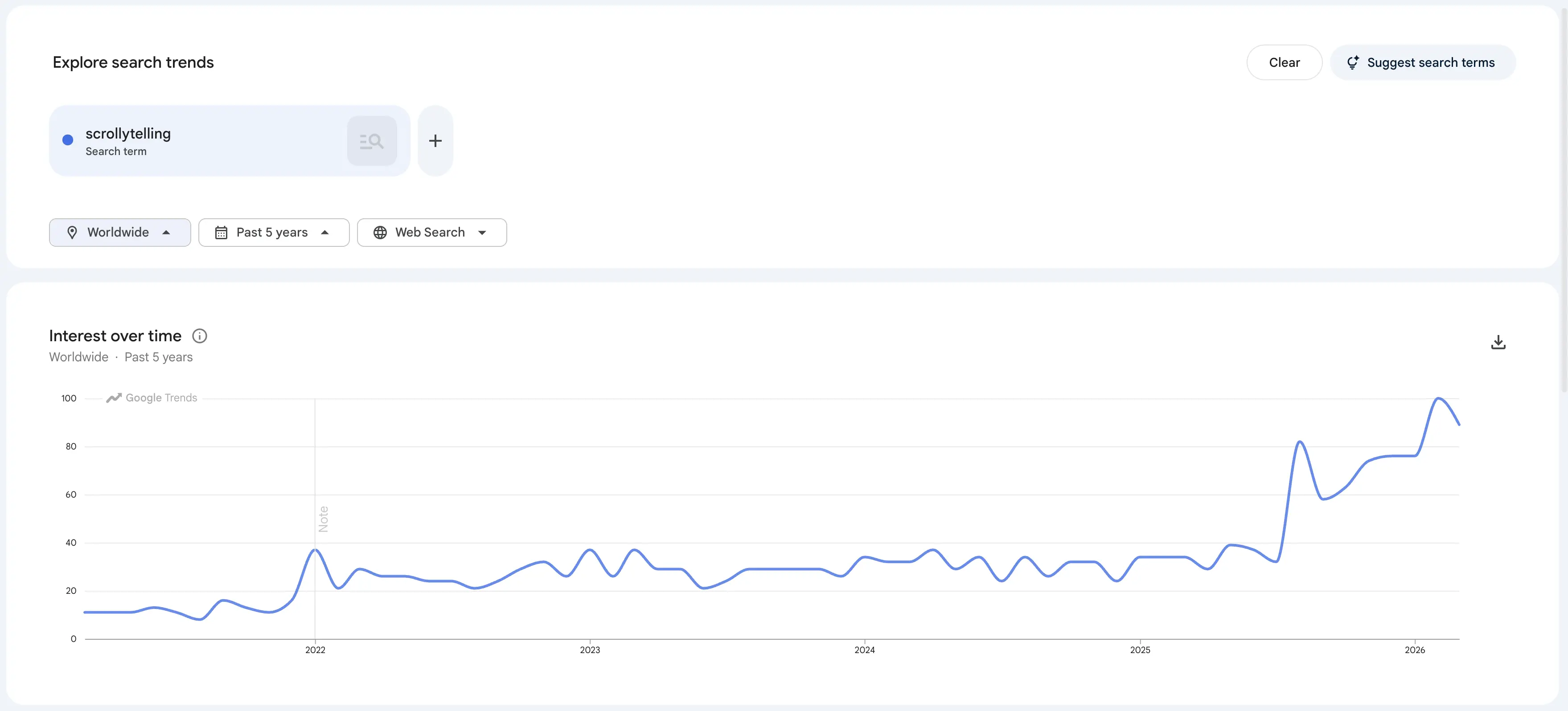
Today, scrollytelling is trending again because the internet has changed. We now live in a world filled with AI-generated content where millions of websites look exactly the same. Website visitors now decide to leave a site in a fraction of a second, so visual storytelling is the best way to stand out and grab their attention. That's why we built scrollytelling.ai - the platform that allows to build these immersive experiences so they are fast, responsive, and affordable. As you can see in the Google Trends chart below, searches for scrollytelling have been steadily increasing as brands realize that "static" pages are no longer enough to keep users engaged.
The psychology of the scroll: why scrollytelling works
People usually scroll through websites without thinking about it. Scrollytelling works because it turns that scrolling habit into an attractive game - every time you move your mouse or thumb (on mobile), something happens on the screen: it could be a 3D object spinning around, a quote fading in, or a map zooming into a new city. This creates "micro-rewards" for your brain (yeah, it's all about dopamine). You stay focused because you are curious what the next scroll will uncover.
It's also much more immersive than watching a video, because you feel (and actually are) in control. Scroll fast or very slow - it's up to you. By letting people "drive" the story, it makes them feel connected to it, instead of just being a bored reader.
When to use scrollytelling (and when to stick to static)
Deciding if scrollytelling or a static page is a better choice, there is one important question: Is your goal to inform or to immerse?
Use scrollytelling when:
- You have a specific story to tell - launching a new product, explaining a complex idea, or representing your company's history
- Your target is to make the reader slow down and feel an emotional connection to what they are seeing
- You are doing "deep dives" where visuals are just as important as text
- You want to build a brand and create a memorable experience
Stick to static when:
- Your user is in a hurry and just needs quick information
- People are looking for a shipping price, trying to find your phone number, etc.
- Quick browsing where the user wants to find what they need, click it and leave
- You need to get things done, not tell a story
In short: use scrollytelling to build a brand, but use static pages to get things done.
Build your own scrollytelling experience
Create stunning, interactive visual stories without writing a single line of code. Join thousands of creators using Scrollytelling.
Create your story for freeWays to use scrollytelling
Scrollytelling is a versatile technique that works for almost any industry. Let's cover the most popular use cases when and how you can use it to make your content stand out and keep people reading.
Longform articles and journalism
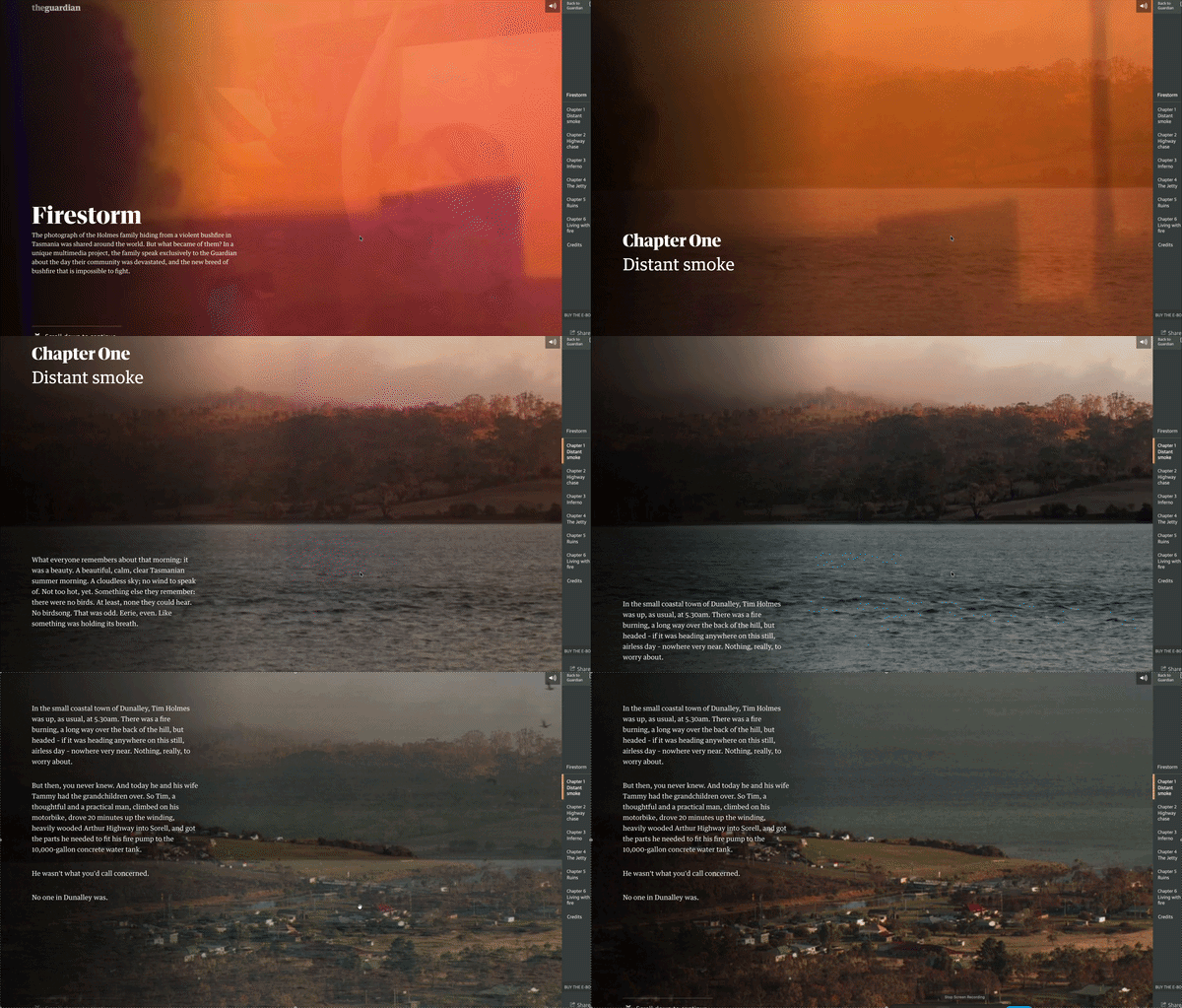
Firestorm - The GuardianWriting a very long story that keeps people's attention is difficult because readers often get bored and leave. Interactive scrollytelling helps fix it by breaking up the text with big images, videos, or maps that change as the person scrolls and reads. It turns a long article into a visual journey that feels more like a movie than a chore. The same principles that make great feature writing work - strong pacing, human angles, and clear structure - apply directly to interactive storytelling.
Showing how a product is built
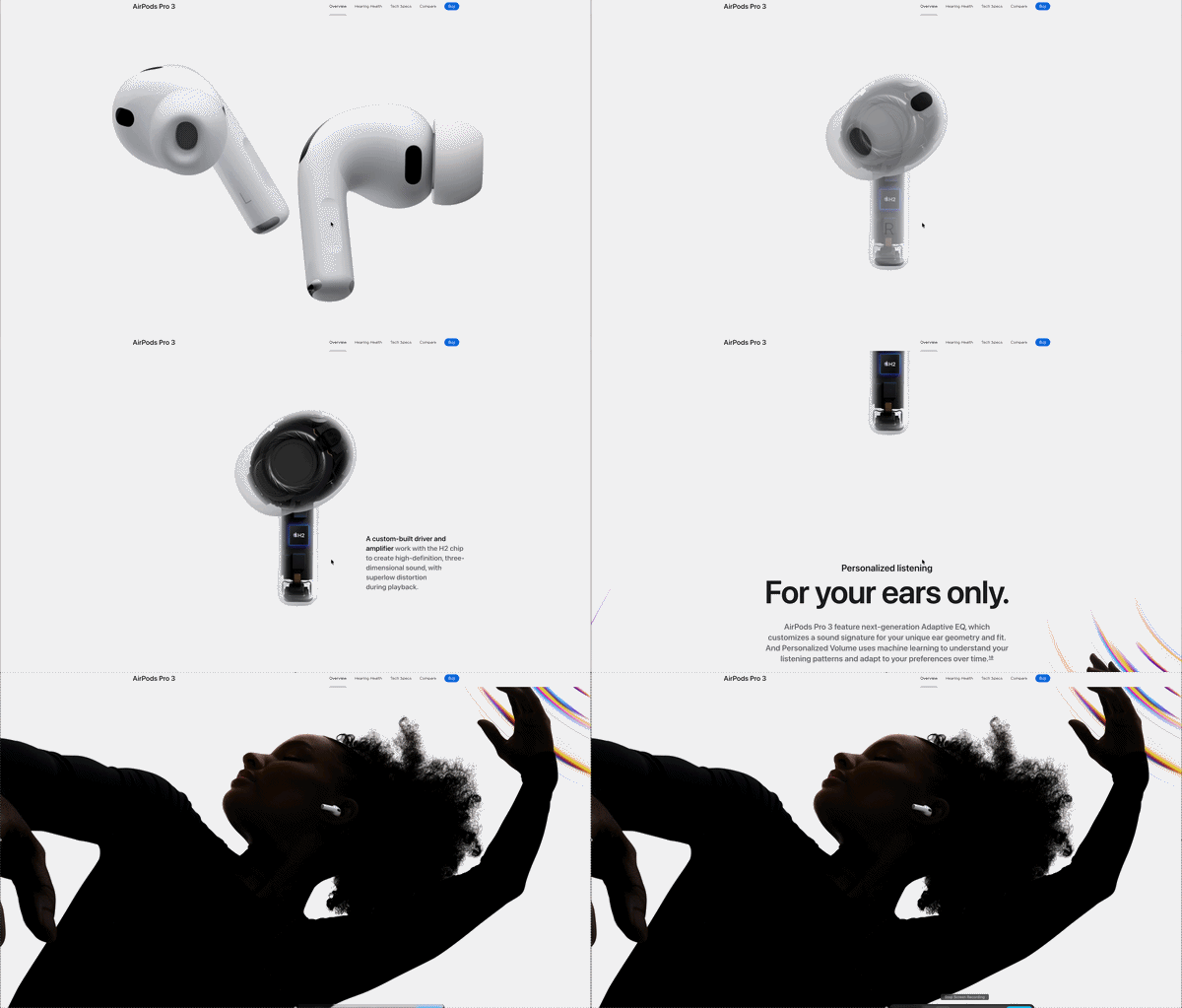
AirPods Pro - AppleIf you have a physical product to sell, for example a piece of technology or a luxury item, you can show exactly what is inside. As a user scrolls, the product can "break apart" or "explode" on the screen so they can see the materials or sensors used. It proves your quality by letting them see the details for themselves - of course you will need to get this kind of video (or at least good quality photos that could be used for generating such video with AI).
Interactive maps and location tours
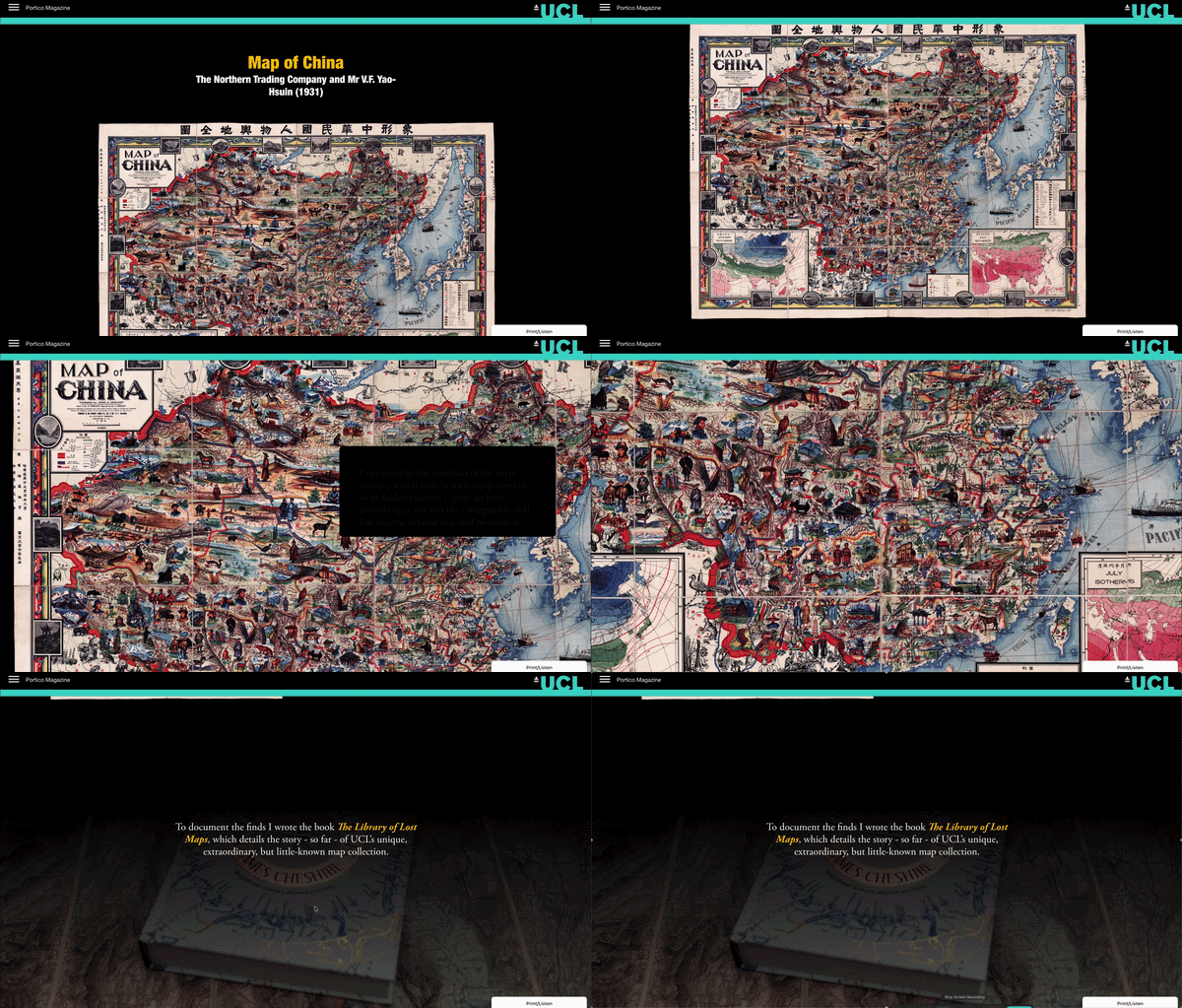
The Library of Lost Maps - UCL PorticoIf you are showing a travel route, real estate development or a historical battle, scrollytelling lets the map move with the reader. As they scroll the map zooms and moves into specific areas and highlights different landmarks. It's much more engaging than a static map image.
There are many other use cases where scroll-based visual stories help you better tell your stories:
- Step-by-step tutorials and e-learning
- Recruitment and company culture
- Event and conference landing pages
- Making company reports easier to read
- Giving a tour of your software
- Explaining data and complex charts
Scroll-driven pages also make excellent campaign sites. Try the free microsite builder to see one generated from a single sentence.
You can find more interactive storytelling examples in our detailed scrollytelling examples research article, or explore our curated feature writing examples to learn how professional journalists structure compelling narratives.
The performance paradox: why most scrollytelling sites fail
The performance is a frustrating problem - the more beautiful and interactive you make a website, the more likely it is to break on different screen sizes or load slowly because of images and videos. When trying to achieve a "wow" experience you shouldn't forget that many people are viewing the site on mobile phones - so small screen size and often slower internet connection. When you add high-quality 3D models, unoptimized videos, and many scripts to control the scroll, the browser has to work extremely hard and this leads to annoying stuttering or lagging which is the opposite effect than you want.
This paradox is why so many scrollytelling sites fail in the real world. Even if the visual part is a masterpiece, users will bounce if it takes more than 3 seconds to load. Also Google "punishes" slow websites, specific scoring is used like how long it takes for the biggest image to appear or how much the layout "jumps" around, and according to such measurements it's decided what gets to be on the first page of search results.
If you want to succeed and not fail because of bad performance you have to find the balance: your site needs to be cinematic enough to grab attention, but lightweight enough to load instantly on every device. There are some perfect standout scrollytelling examples that are really immersive and perform very well at the same time.
FAQ
What is "scroll hijacking" and is it bad?
Scroll hijacking is when a website takes control of your scroll wheel and makes the page move at a speed it chooses, rather than how fast you are actually flicking your finger. Most users hate this because it feels like losing control.
The best scrollytelling avoids this by using scroll-synced animation. This means if you stop moving your finger, the animation stops instantly. The user should always feel like they are the driver, not a passenger on a ride they can't stop.
How do I make scrollytelling work for people with disabilities?
This is a major gap in many sites. People who use screen readers or "keyboard-only" navigation still need to access your story. You should ensure that all your text is "readable" by software and that the story still makes sense even if the animations don't play. A good practice is to provide a "Skip to Content" button or a standard "Static" version of the page for users who have motion sensitivity (Vestibular Disorders).
Does scrollytelling work on mobile phones?
It does, but you have to design for the "thumb," not the mouse. On a desktop, you have a lot of space. On a phone, everything is narrow. Many designers use "conditional loading," which means the phone version of the site might show a simpler animation than the desktop version to save battery and data. The goal is to keep the "feeling" of the story the same, even if the 3D effects are slightly simpler.
How can I measure if my scrollytelling is actually working?
Traditional stats like "Page Views" don't tell the whole story. You should look at Average Scroll Depth. This tells you exactly where people stopped scrolling. If 90% of your readers drop off at the second "chapter," you know that part of your story is boring or too slow. You can also track "Time on Page" - a high-quality scrollytelling site usually keeps people engaged for 3 to 5 minutes, which is much longer than a standard blog post.
What tools should I use to build this in 2026?
You no longer need to write thousands of lines of JavaScript code. For high-end 3D, many designers use Spline or Three.js. For layout and motion without coding, tools like Scrollytelling.ai or Framer are the standard. These platforms allow you to drag and drop your elements and "attach" them to the scrollbar, taking care of the technical performance issues for you. See our complete guide to scrollytelling tools and digital storytelling platforms for a detailed comparison.
Can I use sound or music with scrollytelling?
Sound can make a story much more immersive (like in the "The Boat" example), but it can also be very annoying if it starts blasting unexpectedly. Always follow the "User First" rule: Start the site on mute and provide a very clear "Unmute" button. Using "ambient" sounds (like wind or traffic) that get louder or quieter as you scroll into different sections is a great way to add depth without being distracting.
Is scrollytelling expensive to create?
It used to cost $50,000+ because you needed a team of specialized developers. In 2026, the cost has dropped significantly. If you use "no-code" or "low-code" platforms, a small team or even a single designer can build a professional experience in a few days. The main cost now isn't the coding - it's the "creative heavy lifting" of writing a good story and finding the right visuals. We compared the best digital storytelling platforms including pricing so you can find the right fit.
How do I handle navigation? Can users skip to the end?
One of the biggest mistakes is forcing a user to scroll through 10 minutes of content to find one specific fact. You should always include a sticky navigation menu or a "Progress Bar" on the side of the screen. This allows users to see how much is left and click on specific chapters to "jump" ahead if they are looking for something specific.
Go deeper
- Scrollytelling design patterns — the sticky figure, the scrubbed sequence, step triggers, and the mobile fallback most implementations get wrong.
- What is a microsite?
- Famous scrollytelling examples — the works that defined the format, from Snow Fall in 2012 onwards.
- Scroll-driven storytelling — the developer's guide: scroll-linked vs scroll-triggered, CSS scroll timelines, scrollama and GSAP.
- Agencies vs building it yourself — when commissioning a studio is genuinely the right call.
Ready to create your scrollytelling story?
No code required. Build interactive, scroll-driven experiences that captivate your audience and rank on Google.
Get started for free