Before you start: one reader, one action
Every good one-pager answers two questions before a word is written: who is reading it, and what should they do next. Everything else on the page exists to get that one person to that one action. Write them down at the top of your draft:
| Reader | The one action you want |
|---|---|
| Investor | Take a first call |
| Buyer | Book a demo or a trial |
| Your manager | Approve the budget |
| Donor | Give, ideally monthly |
| Event visitor | Register |
| Teacher | See that you understood the book |
If you have two readers, make two one-pagers. A page for investors and customers at once serves neither.
How to make a one-pager, step by step
Step 1: Choose the reader and the single action
Be specific: not "investors" but "seed investors who back B2B software". Not "customers" but "owners of three-van plumbing companies". The narrower the reader, the easier every later choice becomes, from the headline to the photo.
Step 2: Gather the raw material
Collect more than you need, because a one-pager is made by cutting. Put it all in one document first:
- A one-sentence description of what you do
- The problem, with at least one number
- Three to five proof points: customers, growth, results, ratings
- One customer quote with a name and a role
- Logos, awards, press mentions
- Photos, a screenshot or a simple chart
- The price, the deadline or the next step
- Contact details and the link you want people to visit
Step 3: Write the headline and the one-line pitch
The headline carries the page. A reliable formula: what you do + for whom + the result they get, in twelve words or fewer. Then one or two sentences underneath that add how.
| Weak headline | Strong headline |
|---|---|
| Innovative AI-powered analytics platform | Your store's numbers, explained in plain English every Monday |
| We are a leading strategy consultancy | We cut leadership decision time by 60% in 90 days |
| A great app for productivity | Plan your whole day in two minutes, by voice |
| Help us make a difference | Help us serve 500,000 meals this winter |
Step 4: Write the body in short blocks
Write each block as if it were the only one the reader will see. Use this word budget; the total lands between 250 and 500 words.
| Block | Length |
|---|---|
| Headline | 12 words or fewer |
| One-line pitch | 20 to 30 words |
| Problem | 30 to 50 words, with a number |
| Solution | 40 to 60 words |
| Proof | 3 or 4 figures with units |
| What you offer | 3 bullets of about 15 words |
| Why you | 3 bullets of about 10 words |
| Call to action | 10 words or fewer, plus the link |
Step 5: Add proof
Numbers beat adjectives. "3,200 stores" beats "trusted by thousands"; "+11% median revenue after 90 days" beats "proven results". Give every number a unit and a timeframe, add one quote with a real name and role, and use logos only if the reader will recognize them. If you cannot back a claim up, cut it: one unsourced statistic makes the reader doubt the true ones.
Step 6: Design the page
Set up a clear hierarchy: the headline is the biggest thing on the page, the numbers come next, the body text is the smallest. Pick one of the four standard layouts, use two fonts at most and one accent color, and let white space separate the blocks.
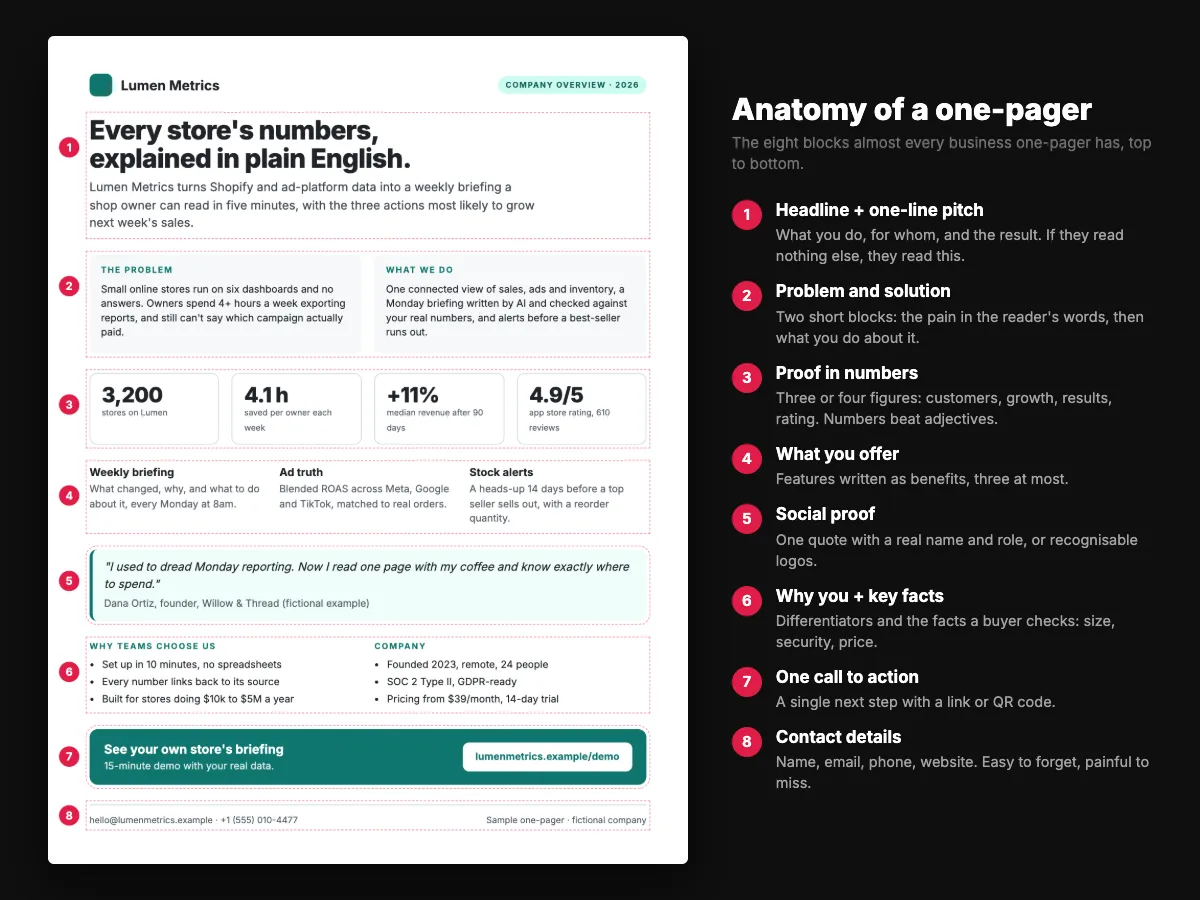
Images should carry information: a product screenshot, a chart of traction, a photo of the real team. Skip decorative stock photos. Layout patterns and sizes are in the one-pager format guide.
Step 7: End with one call to action, then test and share
Close with a single next step and print the link in full, so the page still works on paper. Then run the ten-second test: hand it to someone who does not know your project, take it back after ten seconds and ask what you do and what you want from them. If they cannot answer both, rework the headline and the call to action.
Finally, decide how it travels. Export a PDF for print and email attachments. If most readers will open it on a phone, or you want to update it after sending and see whether it was read, publish it as a web page and send the link.
Worked example: from notes to one-pager
Here is how the raw notes for a fictional analytics startup became the company one-pager in our examples:
| Raw note | On the one-pager |
|---|---|
| "We do AI analytics for Shopify merchants, dashboards, alerts, reports" | Headline: "Every store's numbers, explained in plain English." |
| "Owners waste time on reports" | Problem: "Owners spend 4+ hours a week exporting reports, and still can't say which campaign actually paid." |
| "Lots of stores, good reviews, customers grow" | Proof row: 3,200 stores · 4.1 h saved a week · +11% median revenue · 4.9/5 from 610 reviews |
| Eleven features listed in the product doc | Three benefits: weekly briefing, ad truth, stock alerts |
| "Book a demo, contact sales, try free, follow us" | One call to action: "See your own store's briefing" with the demo link |
Notice what got cut: eight features, the company history, the team page and every adjective. Browse all 21 one-pager examples to see the same editing on other types.
Which tool should you use?
| Tool | Best for | Good | Watch out |
|---|---|---|---|
| Google Docs or Word | Text-led one-pagers, internal briefs | Free or already installed, easy to comment on | Little layout control; hard to make it visual |
| Canva | Visual one-pagers and sell sheets | Many layouts, drag and drop | Designs look template-made; long text gets messy |
| PowerPoint or Google Slides | One slide set to Letter or A4 | Precise placement, everyone has it | Set the page size first; exports can blur images |
| Figma | Designers | Full control | Learning curve; more than most people need |
| Scrollytelling | Interactive one-pagers shared as a link | AI writes a first draft, scroll animation, works on phones, editable after sending | A web page rather than a print document; HD PDF download is on paid plans |
How to make a one-pager in Google Docs or Word
- Set the page size and margins first: File, Page setup (Docs) or Layout, Size (Word). Letter or A4, margins 0.5 in.
- Insert a two-column table for the layout and hide its borders.
- Use the Title style for the headline and Heading 3 for block labels, so the hierarchy stays consistent.
- Add the proof row as a four-cell table with large numbers and small labels.
- Export as PDF (File, Download, PDF) before you send it.
How to make a one-pager in Canva
- Create a design at Letter or A4 size and search the template library for "one pager".
- Delete every block you do not have content for, rather than filling it with filler.
- Replace the template colors with your one accent color and your two fonts.
- Download as "PDF Print" for printing or "PDF Standard" for email.
How to make an interactive one-pager
Open the free one-pager maker, describe your one-pager in a sentence, and the AI builds the page: headline, sections, images and a hero. Edit anything in the visual editor, then publish it on a free link or your own domain. Or start from one of the one-pager templates.
How to make a one-pager for school
A school one-pager shows what you understood about a book, topic or lesson on a single page, with images and short written responses instead of an essay. Teachers usually grade it on the quotes you choose, how well you explain them and how clearly the page is organized.
- Read the rubric. Note exactly which elements are required: number of quotes, a border, a theme statement, a connection.
- Choose two to four strong quotes and write down the page or chapter for each.
- Pick a central image: a symbol, a setting or an object that sums up the text. It should mean something, not just decorate.
- Plan the layout in pencil first, or print the student one-pager template.
- Write your analysis in your own words: the theme in one sentence, what each quote shows, and your personal connection.
- Add the border: a quote or a key phrase written all around the edge.
- Finish: color it, check spelling and the quote references, and put your name on it.
See a finished example: the Great Gatsby student one-pager.
One-pager checklist
- One reader and one action, written down
- A headline of twelve words or fewer that states the value
- The problem, with at least one number
- The solution in plain words
- Three or four proof numbers with units and dates
- One quote with a real name and role
- Benefits, not features
- One call to action, with the link printed in full
- Contact details
- 250 to 500 words in total
- Body text at 10 pt or larger
- Passed the ten-second test
Start from a one-pager template



Frequently asked questions
How long does it take to make a one-pager?
Writing takes most of the time: plan on one to two hours for a first draft and another hour to edit and lay it out. With a template, or an AI maker that drafts it for you, a first version takes minutes.
How many words should a one-pager have?
Between 250 and 500. Visual one-pagers with big numbers and images sit near 250; text-led briefs near 500.
What font size should a one-pager use?
In print, 24 to 36 pt for the headline, 11 to 14 pt for block labels and 10 to 12 pt for body text. On screen, keep body text at 16 px or larger.
Can I make a one-pager in Google Docs?
Yes. Set the page size and 0.5 in margins, use a two-column table with hidden borders for the layout, and export a PDF. The steps are in the tools section above.
Should a one-pager be a PDF?
A PDF is right for printing and for email attachments. For readers on phones, or when you want to update it after sending and see whether it was read, a web link works better.
How do I make my one-pager stand out?
A specific headline, real numbers, one strong image and a lot of white space. Most one-pagers fail by being crowded, not by being plain.
Can AI write a one-pager?
AI is good at a first draft and at cutting text down. Give it your real facts and numbers, then check every claim. The one-pager maker drafts an interactive one-pager from a sentence.