What is a project one-pager?
A project one-pager (also called a project brief or one-page project summary) is a single page that tells a sponsor or manager what a project will deliver, why it matters now, what it costs, how long it takes and what you need them to decide. The project owner sends it before a planning or budget meeting. Its job is a clear answer by a named date: approve, change or stop.
It is a decision document, not a plan. The task list, the detailed schedule and the technical design live elsewhere. The one-pager is what a busy sponsor reads to decide whether those documents are worth opening.
If your teacher has assigned a "one-pager project" on a book or a topic, that is a different format, with quotes, a central image and a personal response. See how to make a one-pager for school and the student one-pager example.
When to use a project one-pager, and when another format is better
Use it:
- To ask for budget, people or a go-ahead before work starts.
- As the pre-read for a steering or planning meeting.
- At kickoff, so everyone works from the same goal, scope and dates.
- When the project changes hands and the new owner needs the short version.
Use something else when:
| Situation | Better format |
|---|---|
| The project is approved and the team needs the detail | A project plan, with the one-pager as its first page |
| You are summarizing a long report or a strategy | An executive summary |
| The reader is a client who needs a scope and a price | A sales proposal |
| You are describing a finished product to buyers | Product one-pager |
| You are asking investors for money | Startup one-pager |
| You are asking donors or a foundation for money | Nonprofit one-pager |
What to include in a project one-pager
| Block | What it says | Target length |
|---|---|---|
| Title and owner | A project name that states the outcome, the owner and the date of this version | 1 line |
| Why now | The current state in numbers, and what it costs to leave it | 30 to 40 words |
| Goal | One measurable target with a date | 1 sentence |
| Budget | The total, split into two or three lines, with staff time if that is the main cost | 1 figure plus the split |
| In scope and out of scope | What the project will deliver, and what it will not touch | 3 bullets each |
| Timeline | Milestones with dates, not tasks | 4 or 5 dates |
| Team | Lead, builders and sponsor, by name | 3 to 5 lines |
| Risks | The top three, each with its mitigation | 3 lines |
| Decision needed | What you want approved, by whom and by when | 1 line with a date |
Total: 250 to 400 words. If the success metrics differ from the goal, add them as one line under it. Leave the task-level plan out and link to it.
Project one-pager example (free PDF)
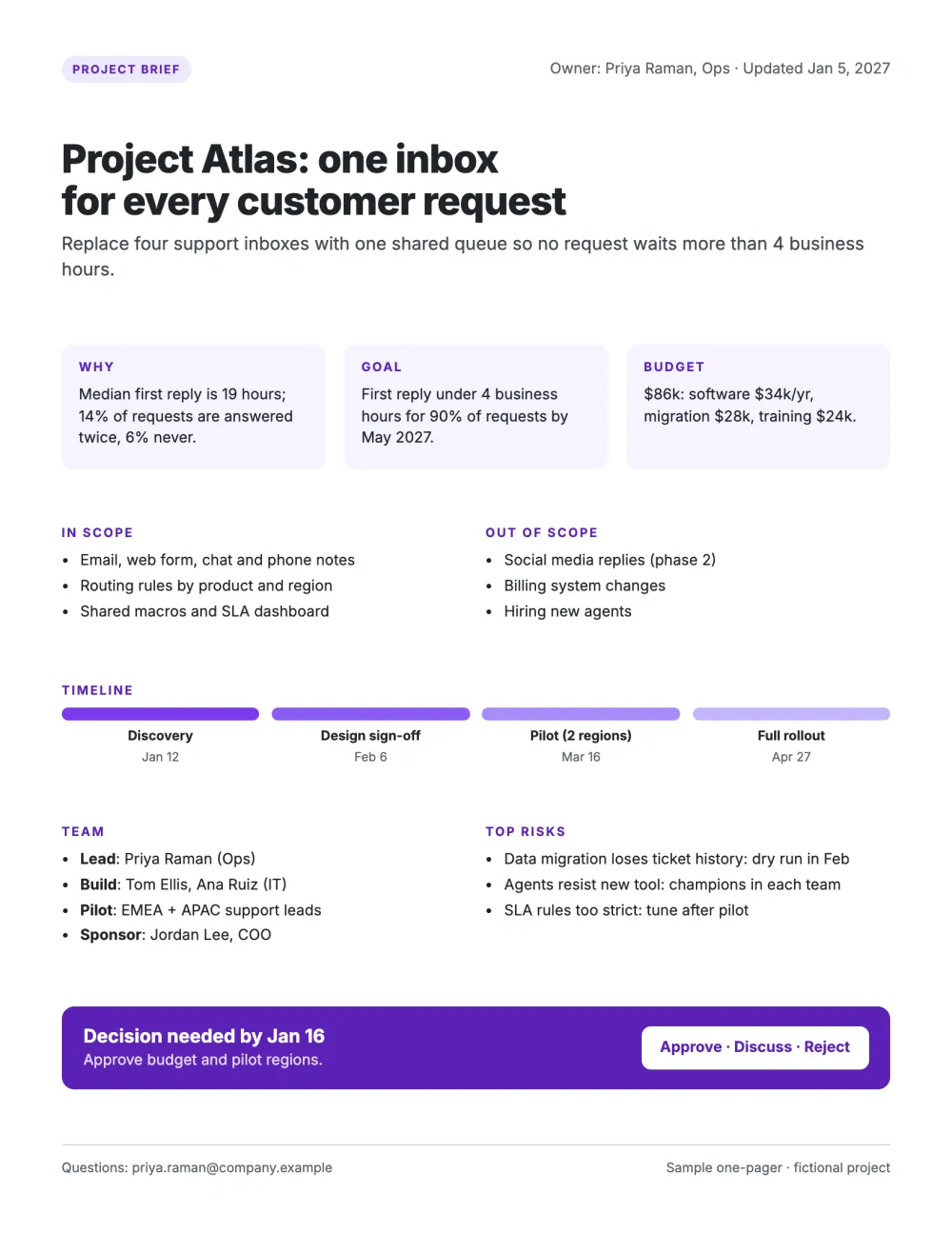
Project one-pager example (project brief)
Our sample is the brief for Project Atlas, a fictional project that replaces four support inboxes with one shared queue. The people and figures are invented. The owner and the date of the version sit in the top right corner. Three boxes carry the case: why (the current response times), the goal (a target with a date) and the budget (a total split into three lines). Then come the scope in and out of the project, a four-step timeline with dates, the team by role, the top three risks with their mitigations, and a band with the decision needed and its deadline. There is no blank version: use the example as your template and keep the block order.
What to copy
- The title states the outcome ("one inbox for every customer request"), not only a code name.
- The goal is a number with a date, so the project can be judged against it later.
- The last band names the decision and offers three answers: approve, discuss, reject.
Interactive project one-pager template
The template below is a web page, not a file: you edit it in the browser and share it as a link. The image shows four moments of the scroll.
Project plan one-pager template
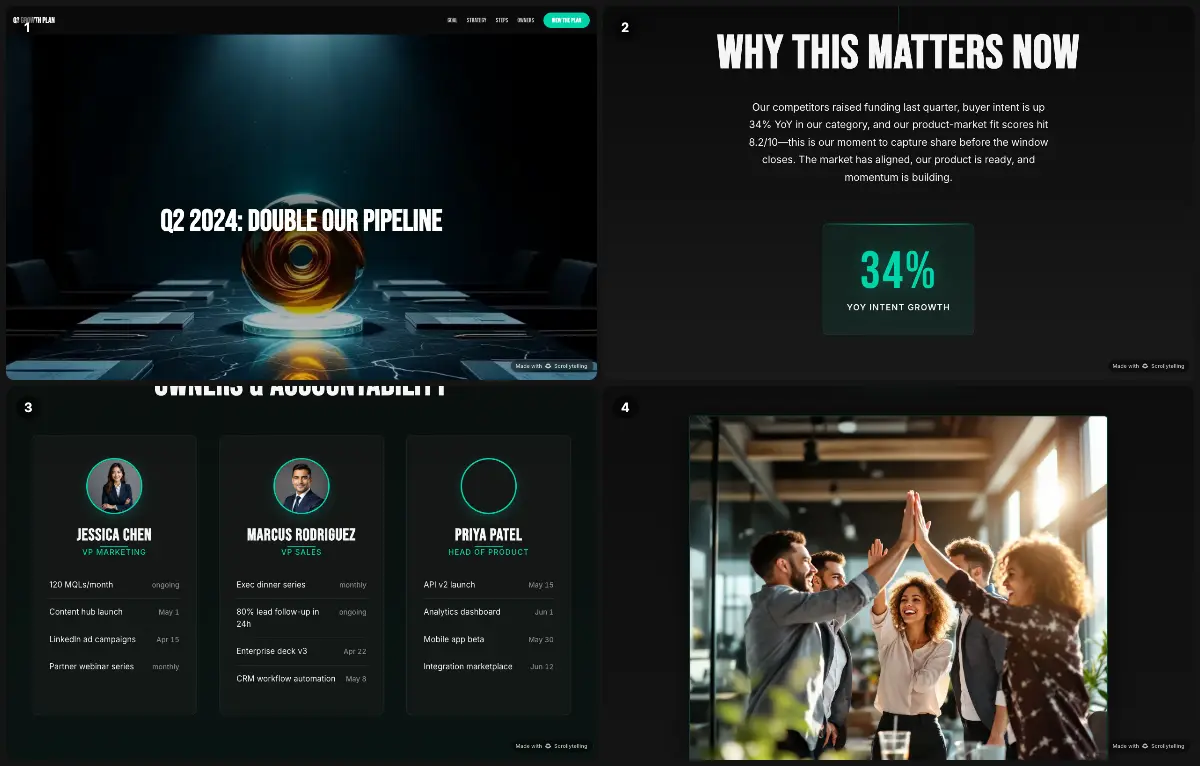
The sample is a quarterly growth plan with one goal in the headline. It scrolls through why the goal matters now (with one large figure), the strategy, the steps and an owners section where each lead has a card that lists commitments with dates. A "View the plan" button stays in the header. It works best after approval, as the page the whole team opens from chat: the printable brief gets the decision, the interactive plan keeps people aligned on it. Names and figures in the sample are placeholders.
Worked example: the copy for a project brief
The key lines of a brief for Project Lantern, an invented warehouse project. All names and figures are made up.
Title and owner
Project Lantern: every pick scanned, none written down · Owner: Sam Okafor, Warehouse · Version of February 20
Why now
Pickers work from paper lists. 3.1% of orders ship with a wrong item, and each return costs $14 in freight and labor.
Goal
Wrong-item rate under 0.5% by September 30.
Budget
$42k: scanners $18k, software $15k a year, training $9k.
Decision needed
Approve the budget and a two-aisle pilot by March 6.
A sponsor can answer this page with one word. That is the test for a project one-pager.
7 project one-pager mistakes to check
- No decision requested. A brief that only informs gets a "thanks". End with what you need approved, by whom and by when.
- A goal with no number. "Improve response times" cannot be approved or measured. Give a target and a date.
- No out-of-scope list. Saying what the project will not do prevents arguments later. List three exclusions.
- Risks without mitigations. A risk list alone reads as a warning. Add what you will do about each one and who owns it.
- A budget with no breakdown. Split the total into two or three lines, and say whether staff time is included.
- The whole plan on one page. A compressed Gantt chart is unreadable. Keep four or five milestones with dates and link to the plan.
- No owner or version date. Briefs get forwarded and outlive their first draft. Put the owner's name and the date of this version at the top.
Printable or interactive: which one to send
For most internal briefs a shared document or a PDF is the right tool: reviewers can comment on it, and the file can be attached to an approval request. Print it for the meeting where the decision is made.
An interactive page earns its place when the project has to win over people outside the core team, for example a company-wide rollout, a change program or a public initiative, where a timeline, photos and a short video explain more than a memo. Treat a published page as public, because anyone who has the address can open it, and keep confidential budgets in the internal document.
Project one-pager FAQ
What is a project one-pager?
A one-page summary of a project, written for the person who has to approve or support it. It states the goal, why now, the scope, the budget, the timeline, the team, the main risks and the decision needed.
What should a one-page project summary include?
A title that states the outcome, the owner and version date, why the project matters now with a number, one measurable goal, the budget with a breakdown, the scope in and out, four or five milestones, the team, the top three risks with mitigations, and the decision you need with a deadline.
Is there a free project one-pager template?
Yes. The project brief example on this page is a free PDF to use as a template, and the interactive project plan template is free to edit in the browser. We do not offer a Word or Excel file. To rebuild the layout in a document editor, follow the Google Docs and Word steps.
What is the difference between a project one-pager and a project charter?
A project charter is a formal document that authorizes a project and sets out roles, authority and governance, often over several pages. A project one-pager is the short summary used to get the decision. In small organizations the one-pager often serves as the charter.
What is a one-pager project in school?
A school assignment in which a student sums up a book, a topic or a lesson on a single page, with quotes, a central image and short written responses. It is a different format from a business project brief: see the student one-pager example.
How long should a project brief be?
One side of US Letter or A4, about 250 to 400 words. Anything longer goes into the project plan that the brief links to.
Draft your project one-pager
Describe the project and the decision you need in a sentence. The free one-pager maker writes and lays out a first version that you can edit, publish as a link or download as a PDF.
Open the free one-pager maker