Scroll-linked vs scroll-triggered: the distinction everything hangs on
Almost every "why does this feel wrong" scroll bug traces back to picking the wrong one of these two. They are not variations on a theme. They are different mechanisms with different failure modes.
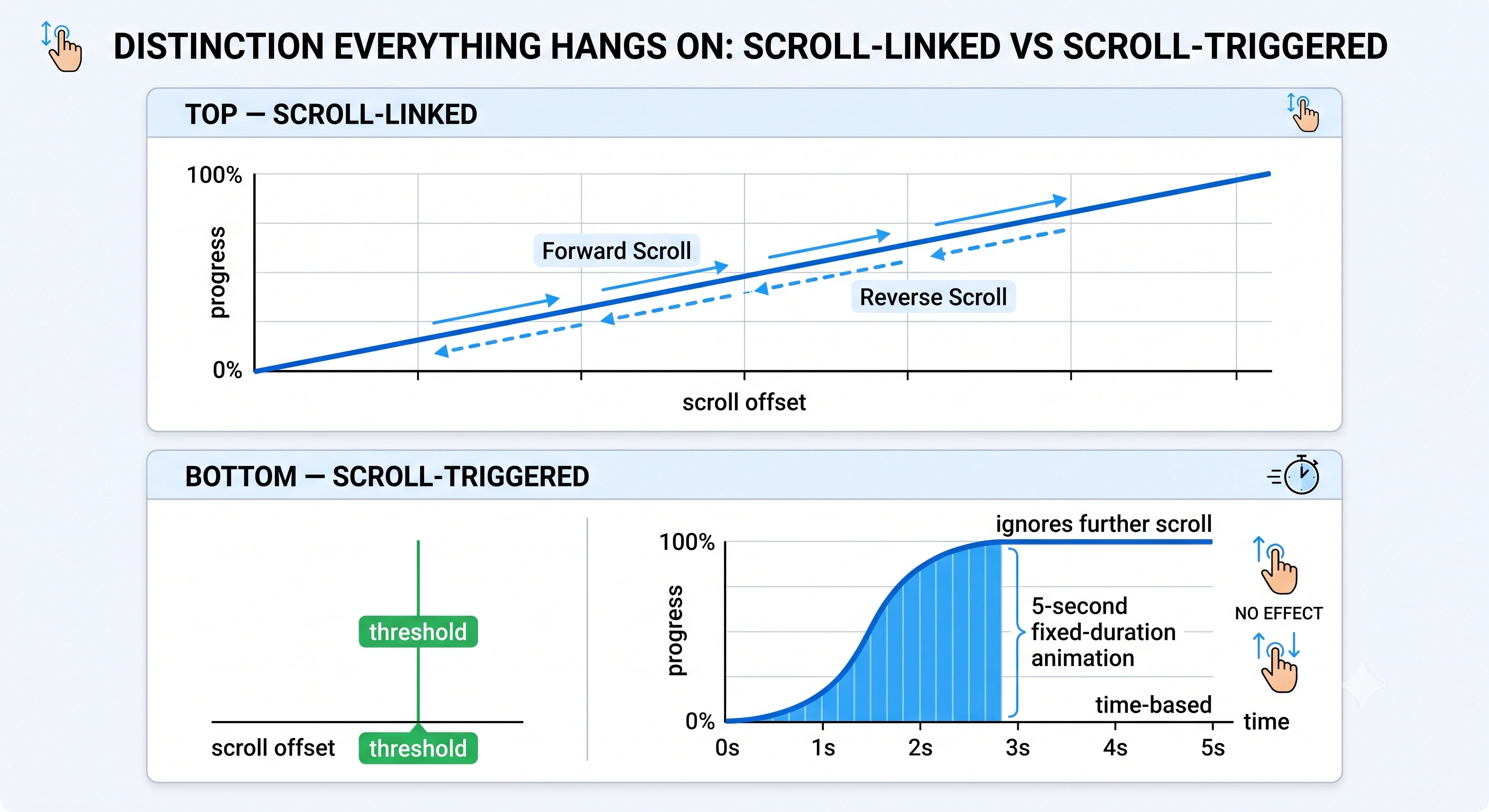
Scroll-linked means the animation's progress is a continuous function of scroll position. The scrollbar is the playhead. Scroll down a third of the way through the trigger range and the animation is a third done; stop and it holds there; scroll back up and it runs backwards, frame for frame. A video sequence scrubbed by scroll, a chart whose bars grow as you descend, a globe that rotates in step with the page — all scroll-linked.
Scroll-triggered means a threshold crossing fires an event, and the animation then plays on its own clock. Once fired, it does not care what the scroll does next. A paragraph that fades up over 400 ms when it enters the viewport is scroll-triggered. So is a counter that starts ticking when its section becomes visible.
The wrong choice creates motion that contradicts the user's input. Scroll-trigger something that should be linked and fast scrollers arrive at a section already scrolled past while the animation is still catching up — it reads as lag. Scroll-link something that should be triggered and a slow reader gets a paragraph frozen at 40 % opacity because they stopped in the wrong place.
The test is one question: if the user drags the scrollbar slowly backwards, should this run in reverse? If yes, it is linked. If it should stay done, it is triggered. Most real stories need both — a scrubbed graphic pinned in place, with text steps that fade in as they arrive — which is why the good libraries expose both, and the bad implementations pick one and force everything through it.
If you want the narrative shapes these mechanisms are used to build — sticky graphic, stepper, reveal, pinned scrub — read the companion piece on scrollytelling design patterns. This page is about the machinery underneath them.
1. Native CSS scroll-driven animations
The browser now has a first-class answer to scroll-linked animation that requires no JavaScript at all. You write ordinary @keyframes, then swap the default time-based clock for a scroll-based one with animation-timeline.
There are two flavours, and the naming is worth getting right because they solve different problems. A scroll progress timeline — scroll() — maps progress to how far a scroll container has been scrolled. A view progress timeline — view() — maps progress to how far a specific element has travelled through the scrollport, which is what you want for nearly all per-element reveals. animation-range then picks which slice of that timeline actually drives the animation.
Reveal each card as it crosses the viewport
.card {
  animation: reveal linear both;
  animation-timeline: view();
  animation-range: entry 0% cover 40%;
}

@keyframes reveal {
  from { opacity: 0; transform: translateY(2rem); }
  to   { opacity: 1; transform: none; }
}
For named timelines across unrelated elements there are scroll-timeline, view-timeline and timeline-scope. MDN's CSS scroll-driven animations module page is the reference; the normative text lives in the CSS Working Group's Scroll-driven Animations Module Level 1 editor's draft.
Support, stated accurately
This is where a lot of blog posts overclaim. As of August 2026: Chrome and Edge have shipped it since version 115 (July 2023), and Safari and Safari on iOS since version 26, announced in WebKit's Safari 26.0 features post on 15 September 2025. Firefox has not shipped it in a release version — MDN's browser-compat data still records preview for animation-timeline and scroll-timeline, meaning pre-release builds only. That single gap is why the feature is not Baseline. Feature-detect and degrade rather than assume:
/* Final state is the default; motion is opt-in. */
@supports (animation-timeline: view()) {
  .card { animation: reveal linear both; animation-timeline: view(); }
}
The upside is real: because these animations are declarative, the browser can run them off the main thread, so they stay smooth under JavaScript load in a way a hand-written scroll handler never will. The limit is equally real — CSS animates, it does not compute. It cannot fetch data, redraw a chart, or decide which of six graphics to show. The moment your story needs logic, you need one of the routes below.
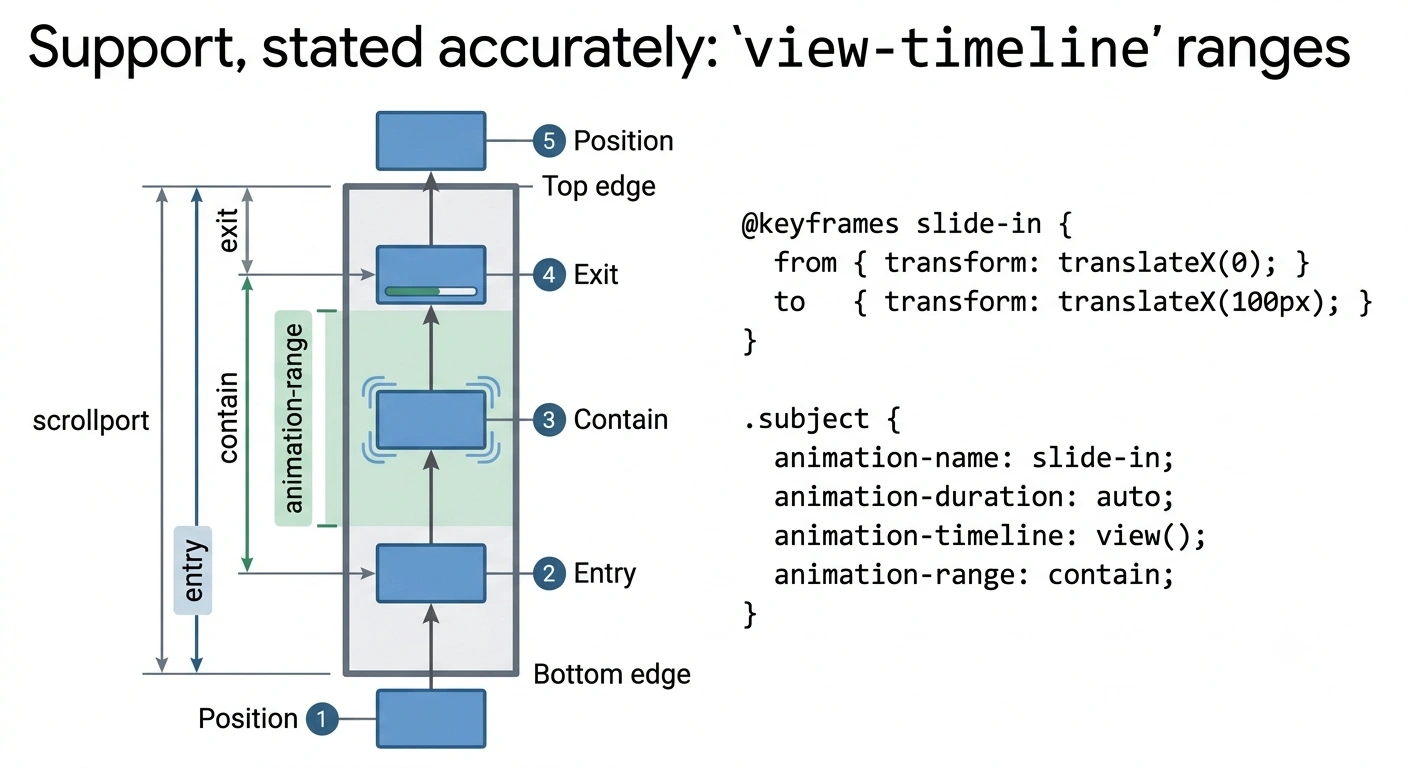
animation-range selects which part of that journey drives the keyframes.2. IntersectionObserver
For scroll-triggered work, the platform primitive is IntersectionObserver. It exists specifically to kill the old pattern of listening to scroll and calling getBoundingClientRect() on a pile of elements — as MDN puts it, that code all runs on the main thread and "even one of these can cause performance problems". The observer hands detection to the browser, which is free to optimise it.
const io = new IntersectionObserver((entries) => {
  for (const entry of entries) {
    if (entry.isIntersecting) {
      entry.target.classList.add('is-visible');
      io.unobserve(entry.target);   // fire once
    }
  }
}, { rootMargin: '0px 0px -25% 0px', threshold: 0.1 });

document.querySelectorAll('.step').forEach(el => io.observe(el));
Three knobs do most of the work. root is the element you measure against (null means the viewport). rootMargin grows or shrinks that box before the test, which is how you make something fire slightly early or wait until it is properly on screen. threshold is the visibility ratio, or an array of ratios, at which the callback runs. Each entry carries isIntersecting and intersectionRatio.
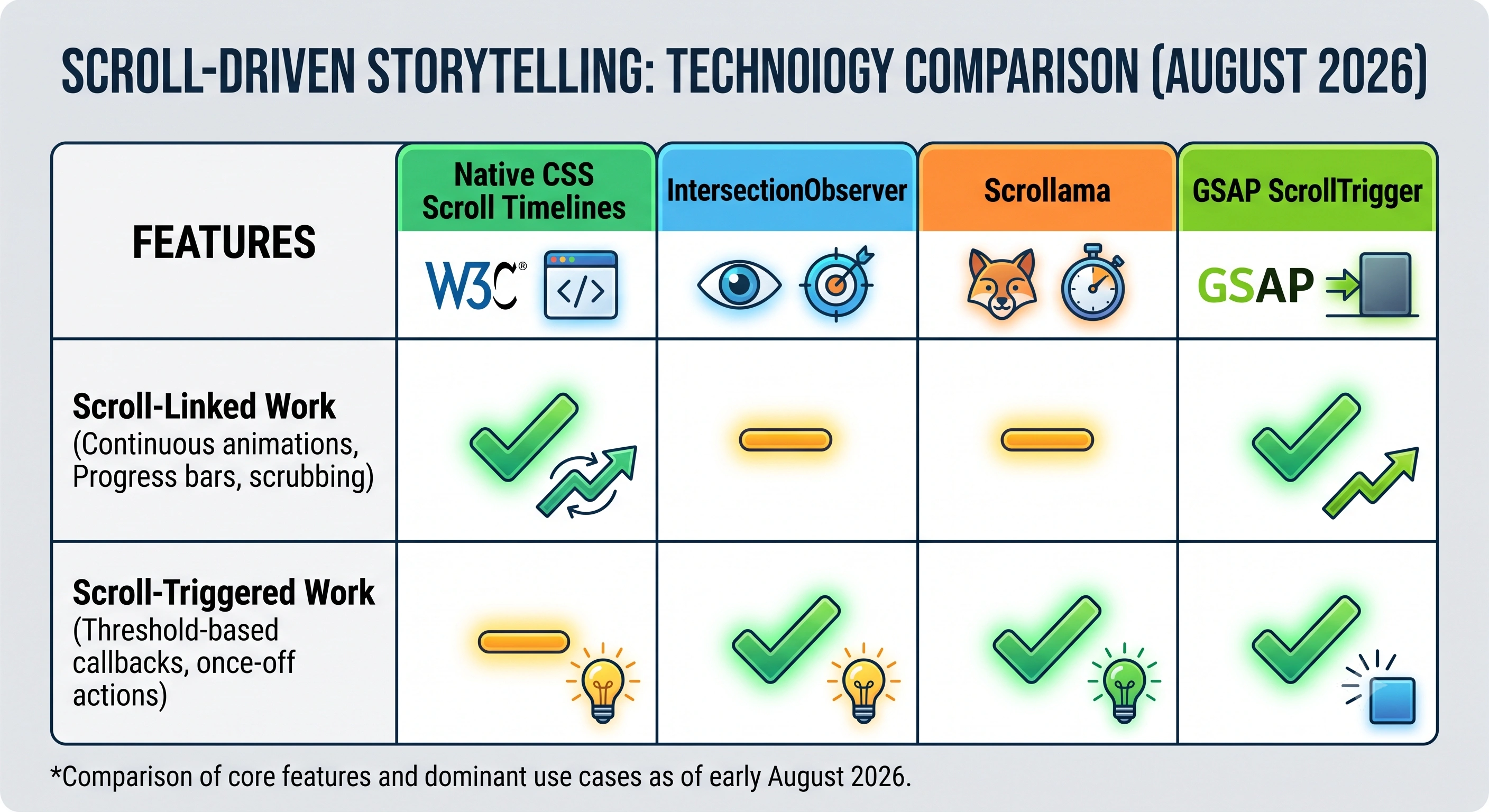
Be clear-eyed about what it is not. IntersectionObserver is a threshold detector: native to scroll-triggered work, awkward for scroll-linked work. You can approximate continuous progress with a dense array of thresholds, but you are simulating a timeline with a staircase. If you need real scrubbing, use CSS timelines or a library built for it.
3. Scrollama
Scrollama is a staple of journalism and data-story codebases, and it is deliberately small: MIT-licensed, version 3.2.0 as of August 2026, written by Russell Samora, described in its own repo as "Scrollytelling with IntersectionObserver." Its stated reason to exist is that scrollytelling "can be complicated to implement and difficult to make performant".
What it adds over the raw observer is vocabulary that matches how a story is written. You declare a selector for your steps and get enter, exit and optional progress callbacks carrying the step index and the scroll direction:
const scroller = scrollama();

scroller
  .setup({ step: '.step', offset: 0.5, progress: true })
  .onStepEnter(({ element, index, direction }) => { /* swap the graphic */ })
  .onStepProgress(({ index, progress }) => { /* 0 → 1 within the step */ })
  .onStepExit(({ index, direction }) => { /* clean up */ });
The defaults are documented and sensible: offset is 0.5, so the trigger line sits halfway down the viewport; progress is off; threshold — the granularity of progress updates, in pixels — defaults to 4; once and debug are off. Two more options cover awkward hosting: container, for when scrollama is nested inside an element with overflow: scroll or auto, and root, which mirrors the observer's own root — the documented route for running inside an iframe.
Before you copy an old tutorial: since version 2.0.0 the container enter/exit callbacks are deprecated in favour of CSS position: sticky, which is now the sane way to pin a graphic. The repo also moved from the author's former GitHub username — russellgoldenberg/scrollama still redirects, but russellsamora/scrollama is canonical.
Scrollama does not animate anything. It tells you which step you are on and how far into it you are; you write the drawing code. That is a feature if you are pairing it with D3 or canvas, and a cost if you expected transitions for free.
4. GSAP ScrollTrigger
If your story is animation-heavy rather than data-heavy, GSAP's ScrollTrigger plugin is the mature option — GSAP's own README calls it "the standard" for scroll-driven animations. It handles both mechanisms in one API, which is the clearest illustration of the distinction this page opened with:
// Scroll-LINKED: scrub ties the tween's playhead to scroll position.
gsap.to('.panel', {
  xPercent: -300,
  scrollTrigger: { trigger: '.rail', start: 'top top', end: '+=3000',
                   scrub: true, pin: true }
});

// Scroll-TRIGGERED: no scrub, so it plays on its own clock once entered.
gsap.from('.callout', {
  opacity: 0, y: 40, duration: 0.6,
  scrollTrigger: { trigger: '.callout', start: 'top 75%' }
});
The presence or absence of scrub is the whole difference. pin handles the sticky-graphic case, including the layout maths of holding an element in place while the page continues past it, and there are callbacks for entering and leaving in either direction.
One point of old advice worth correcting: after Webflow acquired GreenSock, GSAP was made free in 2025, and the repo now states that the entire toolset — including the formerly members-only plugins — is free "even for commercial use" under GreenSock's standard no-charge licence. Check the current terms yourself before shipping; licences change.
The cost is a bundled animation engine plus plugin, and pin in particular restructures layout in ways that will surprise you the first time it meets a sticky header or a transformed ancestor.
5. No-code — and when it is genuinely the right answer
Everything above is code you own forever. A hand-built scroll interactive is not a one-off cost; it is a small permanent liability that has to survive browser changes, framework upgrades, a CMS migration, and the marketing manager who wants to change a headline in eighteen months. Sometimes that is worth it — a bespoke visualisation, an interactive that is the product. Often it is not.
That is the gap Scrollytelling.ai fills: you describe or paste the content, it produces a published scroll story, and there is no repository. If you only need one component rather than a whole page, the free widgets are copy-paste embeds of exactly the patterns above — the scroll video widget is the scroll-linked case, split scroll and stacking cards are the sticky-graphic and stepped-reveal cases. There is a WordPress route if the story has to live inside an existing site.
This does not replace writing your own D3 interactive, and we are not going to pretend it does. It removes the maintenance, which for most teams is the actual constraint. If neither building nor buying fits, the third option is to hire — trade-offs in our guide to scrollytelling agencies, and the annual-report case specifically in interactive annual report software.
Pitfalls that actually ship
Scroll-jacking
Scroll-jacking is overriding the scroll input itself: calling preventDefault() on wheel events, animating scrollTop with your own easing, forcing the page to snap section by section. It is not the same thing as scroll-driven animation, and conflating the two is why "scrollytelling" has a bad reputation in some engineering teams.
The damage is concrete. The scrollbar stops being proportional to the document, so users lose their sense of position. Keyboard paging, Home/End and find-in-page land in the wrong place, because the browser's idea of scroll offset and yours have diverged. Trackpad momentum fights your easing curve. Smooth-scroll libraries that lerp the scroll position have all of these problems by construction, however good the demo looks. The rule: read the scroll, never take it over. Everything on this page can be built without touching the user's scroll input.
Jank, and the two things that cause it
Stutter in scroll work is almost never mysterious. It is one of two causes.
Animating non-composited properties. The browser's rendering pipeline runs layout, then paint, then composite. Animate top, left, width, height or margin and you force layout and paint on every single frame. Animate transform and opacity and the compositor can do the work without going back through layout. Restricting motion to transform and opacity is the single highest-value rule in this whole area.
Layout thrashing. This is the read-after-write pattern: inside a scroll or rAF callback you write to the DOM, then read a layout value — getBoundingClientRect(), offsetTop, scrollHeight — which forces the browser to recompute layout synchronously before it can answer. Do that once per element in a loop over twenty elements and you have twenty forced layouts per frame. Batch all reads first, then all writes. Better still, use IntersectionObserver so you are not measuring in a scroll handler at all.
prefers-reduced-motion
Scroll-driven work is precisely the category of motion that prefers-reduced-motion exists for. The media feature has two values: no-preference, and reduce, which means the user has turned on a reduced-motion setting at the OS level — Reduce motion on macOS, Visual Effects on Windows 11, Motion on iOS, Remove animations on Android. That is not a stylistic preference; large parallax and pinned scrubbing can cause genuine physical discomfort.
@media (prefers-reduced-motion: reduce) {
  .card { animation: none; opacity: 1; transform: none; }
}
Respecting it does not mean deleting the story. It means shipping a version that reads without the movement: end state visible, text intact, sequence replaced by a static image or a manually advanced control. If the reduced-motion version is incomprehensible, the story was carried by the animation rather than by the content — which is a content problem, not an accessibility problem.
The 100vh problem on mobile
Full-height scroll sections and 100vh are a bad marriage on phones. Mobile browsers hide part of the address bar as you scroll and bring it back when you scroll up, so the visible area changes size mid-gesture while vh does not track it. Sections get clipped, sticky graphics jump, and carefully measured trigger points drift.
The fix is the newer viewport-percentage units. lvh is the large viewport — full height with browser chrome retracted, so content can be hidden when the chrome returns. svh is the small viewport — the height with chrome expanded, so content always fits. dvh tracks the chrome dynamically, but MDN warns this "can cause the content to resize while a user is scrolling a page", degrading the interface and costing performance. For pinned scroll sections svh is usually the safe default: nothing is ever clipped, at the price of a little unused space. Never assume 100vh equals what the user can see.
Progressive enhancement
The failure state of a scroll story should be a readable article, not a blank page. Write the final state as the default, then opt into motion — via @supports for CSS timelines, or by adding a class from JavaScript once the observer is wired up. The same discipline covers Firefox missing CSS timelines today, a bundle that fails to load, and any parser that will never execute your code. It costs almost nothing, and it is what separates a scroll story from a scroll trap.
Choosing a route
| Route | Handles | Dependency | Best when | Watch out for |
|---|---|---|---|---|
| CSS timelines | Linked (and simple reveals) | None | Reveals, parallax, progress bars — pure presentation | No Firefox release support as of Aug 2026; cannot express logic |
| IntersectionObserver | Triggered | None | Fire code when a section arrives | Awkward for continuous scrubbing |
| Scrollama | Triggered + step progress | ~1 small MIT library | Step-based narrative with a sticky graphic | Animates nothing itself — you write the drawing code |
| GSAP ScrollTrigger | Both | GSAP + plugin | Animation-heavy sequences, pinning, snapping | Bundle size; pin restructures layout |
| No-code builder | Both | None you maintain | The story ships this month and is edited by non-developers | Less control than hand-written code |
Support details reflect MDN browser-compat data and vendor announcements as of August 2026. Verify before you commit — this area is moving.
A working default for a typical story: CSS view timelines for the small reveals, IntersectionObserver or scrollama for the step logic, and ScrollTrigger only if you genuinely need pinning and scrubbed sequences. Reach for all three at once and you will spend more time reconciling their scroll positions than telling the story.
Frequently asked questions
What is the difference between scroll-linked and scroll-triggered animation?
A scroll-linked animation's progress is a continuous function of scroll position: the scrollbar is the playhead, so scrolling back up runs it backwards and stopping mid-way holds it mid-way. A scroll-triggered animation fires once when a threshold is crossed and then plays on its own clock, independent of what the scroll does next. Scrubbing a video frame sequence is scroll-linked. Fading in a paragraph when it enters the viewport is scroll-triggered.
Can I build scroll-driven storytelling with CSS alone?
For the animation part, often yes. CSS gives you animation-timeline with the scroll() and view() functions, plus animation-range to pick which slice of the timeline drives the keyframes. As of August 2026 it works in Chrome and Edge from version 115 and in Safari and Safari on iOS from version 26, but not in a release version of Firefox, where MDN's compatibility data still lists it as preview-only. Wrap it in an @supports test and design a readable no-animation fallback.
Is scrollama still worth using in 2026?
Yes, if your story is step-based. Scrollama is a small MIT-licensed library by Russell Samora, at version 3.2.0 as of August 2026, that wraps IntersectionObserver in the vocabulary a narrative needs: steps, an offset line, enter and exit direction, and optional per-step progress. It does not animate anything itself, which is the point. It tells you which step you are on and how far through it you are, and you decide what to draw.
Why does my scroll animation stutter?
Almost always one of two reasons. Either you are animating properties that force layout or paint on every frame, such as top, left, width, height or margin, instead of transform and opacity which the compositor handles on its own. Or you are layout thrashing: reading getBoundingClientRect() or offsetTop inside a scroll handler after writing to the DOM, which forces a synchronous layout on every scroll event.
Do I have to disable animation for prefers-reduced-motion?
You have to respect it, which is not the same as deleting everything. The prefers-reduced-motion media feature has two values, no-preference and reduce, and reduce means the user has turned on a reduced-motion setting at the operating system level. Large parallax, pinned sections and scrubbed sequences are exactly what that setting exists to suppress. The right response is a version that still tells the story without the movement: show the end state, keep the text, drop the travel.
When should I not write this myself?
When the story is a one-off and nobody on the team wants to own the code afterwards. Hand-built scroll interactives need maintenance every time a browser, a framework or a CMS changes. If you are building a bespoke data visualisation with custom transitions, write it yourself. If you need a scroll narrative published this month and then edited by a non-developer, a no-code builder is the honest answer.
Ship the story, skip the codebase
If the scroll narrative matters more than owning the implementation, describe it and publish it. No repository, no maintenance, no scroll-jacking.
Create your story → Browse the free widgets →