Best scrolling websites: 16 examples, sorted by scroll effect
A scrolling website uses the scrollbar as its main control: video that plays as you scroll, sections that pin, panels that slide sideways, 3D scenes you fly through. These 16 are grouped by the effect they use, so you can choose the effect first and the inspiration second.
Most lists of the best scrolling websites are sorted by who made them. This one is sorted by what the scroll does, because that is the decision you face when you plan your own: which effect, for which content. Each effect gets a short explanation of when it helps, then the live sites that use it, with one thing to copy and one thing to avoid.
Every site here is one we have reviewed before, and we loaded each one again on November 11, 2026 in desktop Chrome to see what the scroll does today. Where a description here differs from our older review, this is the current one. Performance figures come from the Google PageSpeed tests recorded in those reviews, with the test date next to each. For the reviews, see 27 scrollytelling examples. For where the techniques came from, see famous scrollytelling examples.
Eight scroll effects at a glance
| Effect | What the scroll does | Use it for | Examples below |
|---|---|---|---|
| Scroll-scrubbed video | Plays a clip or image sequence forwards and backwards | Product reveals, transformations, big openings | Lunar, Petralithe, Universe to You, SBS The Boat |
| Parallax layers | Moves background and foreground at different speeds | One opening scene that needs depth | None verified |
| Pinned sections | Holds a visual in place while the text and its state change | One subject with several points to make | UCL Portico, AVATR Vision, Inversa |
| Horizontal scroll | Slides a row of panels sideways | Galleries, timelines, a year in review | Melvin Winkeler, iCoMat, Unseen Studio |
| Scroll-triggered reveals | Fades or draws content in when it arrives | Reports, product tours, long pages | Adidas Annual Report 2024, Quoti |
| Long single page | Carries the whole site on one page | Studios, small businesses, explainers | YES NOW, Nikola Radeski |
| 3D scenes | Moves through a 3D scene, live or pre-rendered | Spatial subjects, cars, products | BMW Group Report 2025, Porsche Motorsport |
| Scrolljacking | Takes over the scroll itself | Nothing: avoid it | None listed |
Scroll-scrubbed video and image sequences
The scrollbar becomes the playhead. A clip or a numbered image sequence moves forward as you scroll down, stops when you stop and runs backwards when you scroll up, usually inside a section that stays pinned while it plays. It helps when the in-between states mean something: a product coming into view, a material catching the light, a journey. It hurts when the frames are too heavy for a phone.
This is the effect people mean by "the Apple scroll animation". How it is built, in code and without code, is covered in Apple-style scroll animation, and you can scrub a clip of your own in the free scroll video playground.

1. Lunar
Visit site ↗What the scroll does: The product page for Lunar, a pneumatic wheel for cabin luggage made in Italy and sold as "the quietest wheel in the universe". The wordmark slides away and a rendered wheel rises out of the dark as you scroll. When we checked, the wheel was painted on a 2D canvas that redrew at every scroll step: pre-rendered frames, no WebGL.
Worth copying: One object, a black background and one line of copy per screen. Pre-rendered frames give a 3D look without asking the visitor's device to render 3D.
Watch out for: Main-thread weight: 21,570 ms total blocking time in our PageSpeed test (March 25, 2026), about 21 seconds in which the page cannot respond. The page also replaces native scrolling with its own.
2. Petralithe
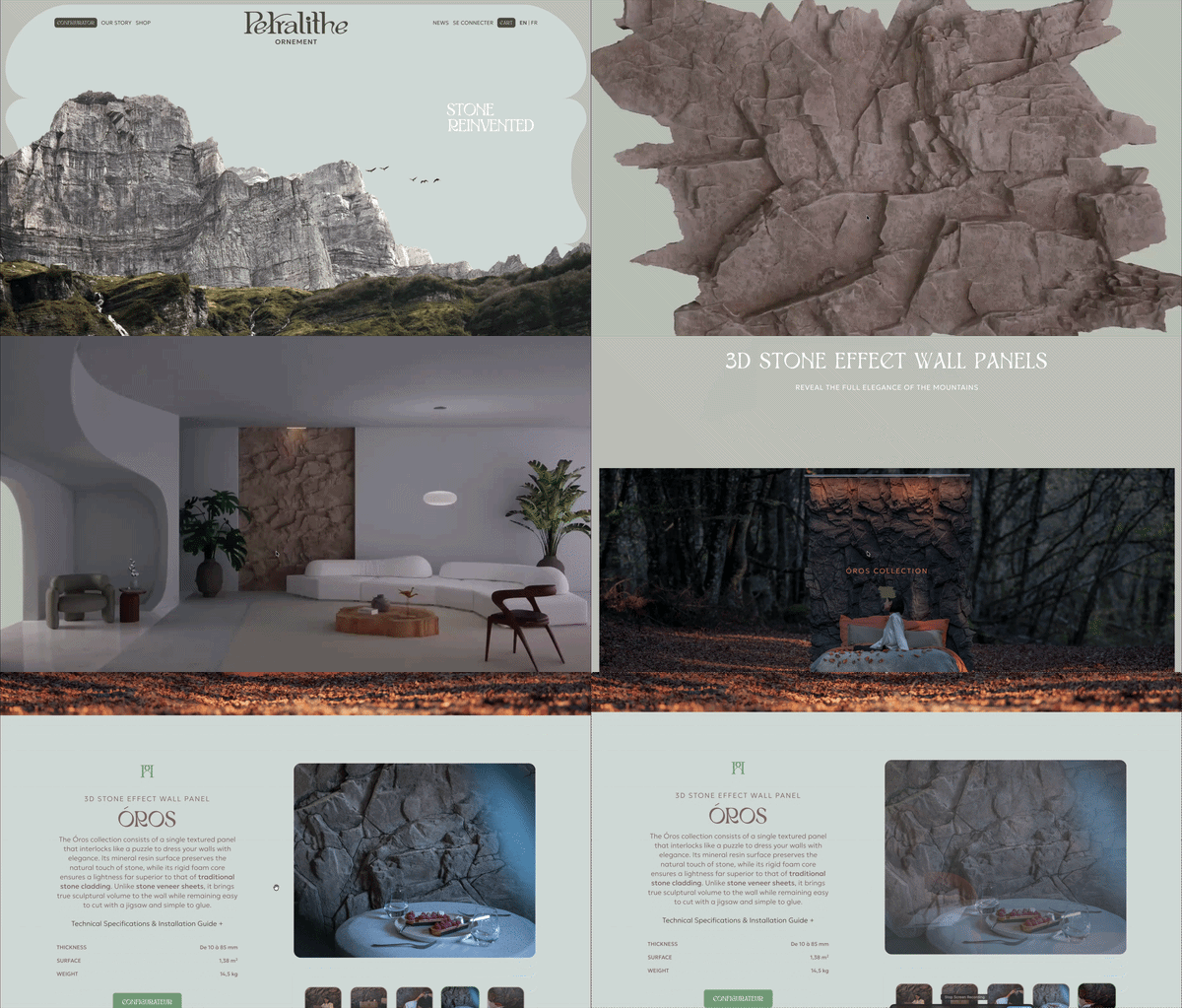
Visit site ↗What the scroll does: Petralithe sells 3D stone-effect wall panels. The page opens on a single panel against a plain background, and scrolling plays a pinned video that carries it onto the wall of a furnished room. When we checked, the video was paused and its playback position followed the scrollbar.
Worth copying: The scrub answers the buyer's first question, what it looks like on a wall, before any copy does.
Watch out for: A performance score of 32, with 2,840 ms total blocking time and a 4.1 s LCP (PageSpeed test, March 25, 2026). Scrubbing a video element is the route most sensitive to encoding and device.

3. Universe to You
Visit site ↗What the scroll does: Our own demo, built with Scrollytelling. One pinned canvas scrubs through 999 frames, zooming from the uniform universe at 10 billion light-years down through the Milky Way toward the Solar System, with a scale bar and a label for each step.
Worth copying: The scroll is tied to something the subject already has. Here it is scale, so every bit of scrolling is a real change in what you see.
Watch out for: Length. 999 frames make a very long page, about 144,000 px tall at desktop width when we checked. That suits a journey and would be far too much for a product page.

4. SBS The Boat
Visit site ↗What the scroll does: SBS turned Nam Le's short story about Mai, a sixteen-year-old put on a refugee boat after the fall of Saigon, into an interactive graphic novel in 2015. Scroll drives Matt Huynh's ink artwork directly: brush strokes build up, the water rises and the boat pitches at the speed of your hand.
Worth copying: The frames are bound to something the story already has. Here it is the sea. The reader's own scrolling rocks the boat, so the effect carries the mood and never reads as decoration.
Watch out for: Loading. Our PageSpeed test (March 25, 2026) recorded a 4.6 s LCP and a 0.201 CLS. The piece holds 222 hand-painted illustrations and 59 animated sequences by the artist's own count, and it starts behind a click-to-start screen.
Parallax layers
Background and foreground move at different speeds, which the eye reads as depth. Parallax works once, in an opening scene that has to establish a place or a material. Used on every section it fights the scrollbar, has little room to work on a phone and is a known motion-sickness trigger, so switch it off for visitors who ask their device for reduced motion.
We have no current example to show. On November 11, 2026 we measured twelve of the sites we have reviewed, comparing how far their images and their text moved on each scroll step. None kept its media moving at a different rate from its text for more than a few steps. Two that our earlier reviews called parallax, AVATR and Petralithe, turned out to pin a scene and scrub a video. On these sites a pinned scene or a scrubbed sequence now does the job parallax used to do, and it stays tied to the scrollbar.
Pinned (sticky) sections that swap content
One visual holds its place in the viewport while the text beside or over it changes, and each new block of text changes the visual: the map moves, the chart gains a line, the product shows another feature. This is the core scrollytelling layout and the best choice when you have one subject and several things to say about it. The rule that keeps it honest: one step, one visible change.
The newsroom originals, The New York Times' Snow Fall (full-bleed media held in place while text moves over it) and Bloomberg's climate chart (one sticky graphic, many text steps), are covered in famous scrollytelling examples. The split scroll and sticky split widgets are this layout as free playgrounds.

5. UCL Portico: The Library of Lost Maps
Visit site ↗What the scroll does: A feature in UCL's Portico magazine about a map library. The visual stays pinned while boxes of text scroll over it: first film of the map room, then a 1930s illustrated wall map of China that the page zooms into as the paragraphs describe it, then a map of London from 1869.
Worth copying: One step, one visible change. Every paragraph earns its scroll because the map moves to match it, and each new map reads as a scene change.
Watch out for: A 6.9 s LCP (PageSpeed test, March 25, 2026). High-detail maps need modern image formats and lazy loading.
6. AVATR Vision
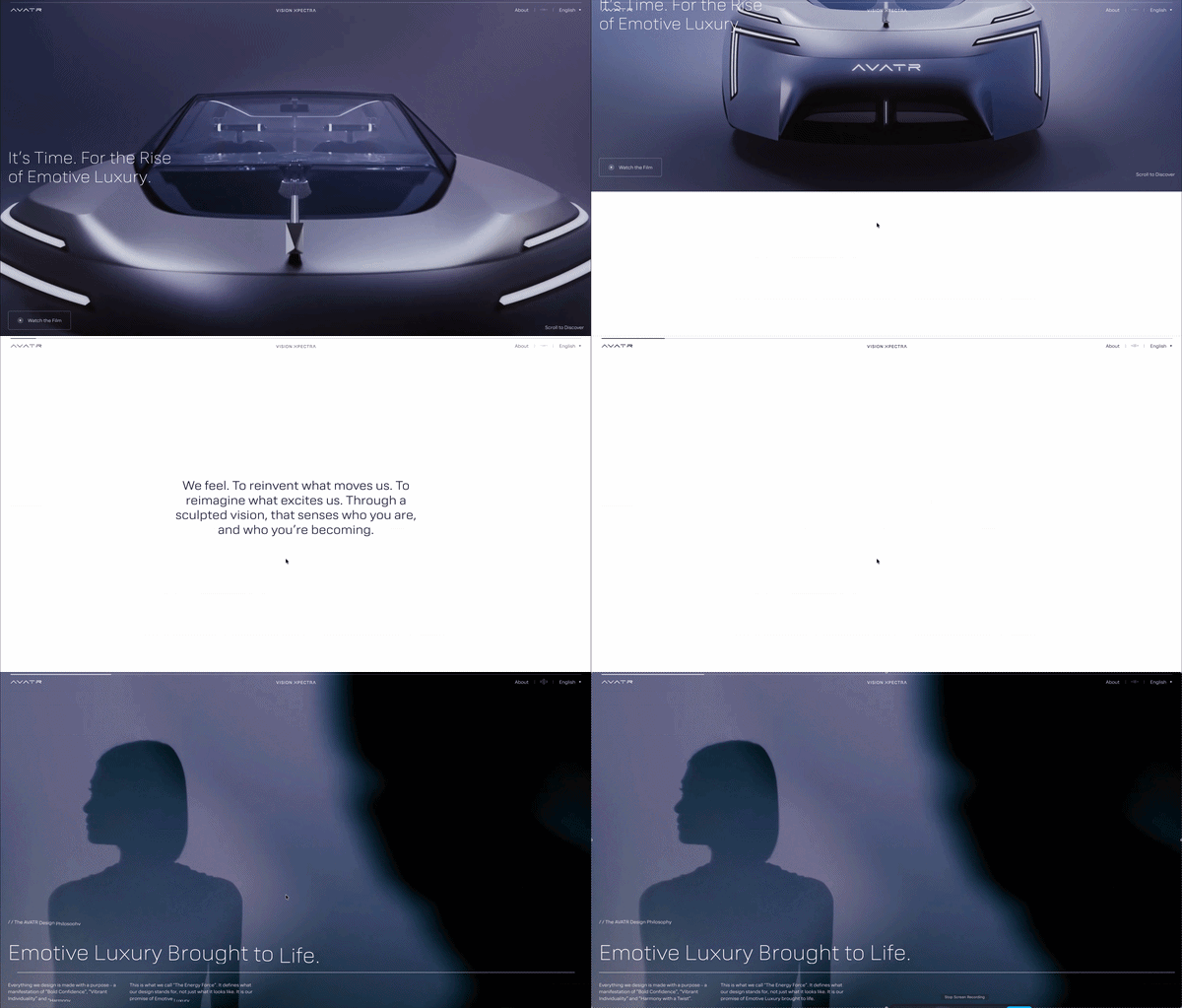
Visit site ↗What the scroll does: AVATR presents its Vision Xpectra concept car on its own subdomain. After an "Enter the Experience" screen, full-screen renders of the car hold in place while the chapter text changes (Solid, Soft, Particles), then give way to the next scene.
Worth copying: One idea per scene and a short label for each, so a very long page still reads as chapters.
Watch out for: 2,170 ms total blocking time and a 0.174 CLS (PageSpeed test, March 25, 2026), plus a loading gate before the first scene.
7. Inversa
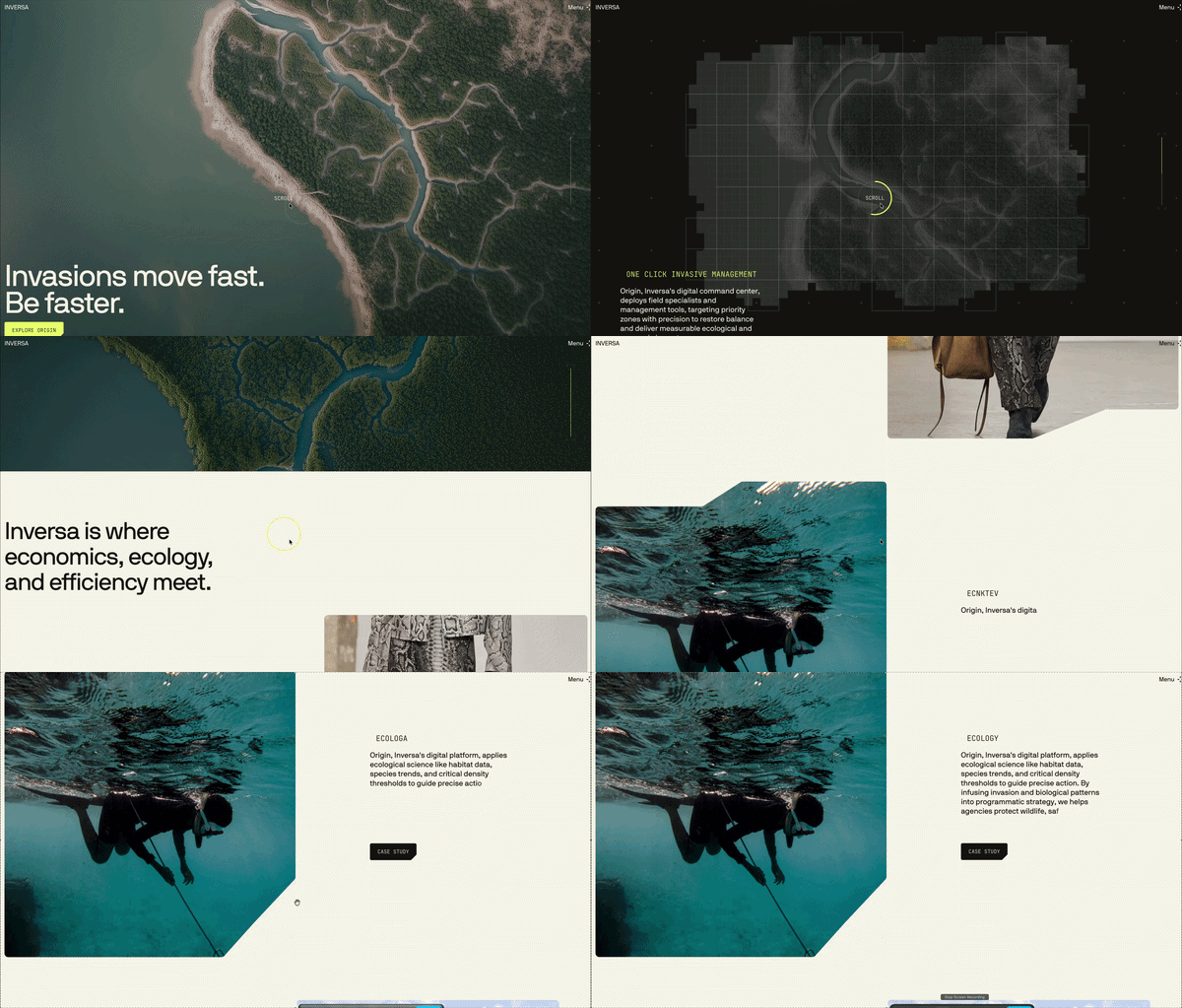
Visit site ↗What the scroll does: Inversa is an invasive species management company with a leather brand, Inversa Leathers. Its home page holds an aerial view of a river delta in place while short captions and markers change over it, from damaged ecosystems to restoration.
Worth copying: Pin when you want the reader to stay with one image. The captions are short enough to read without leaving the picture, and the layout barely moves: CLS was 0.033 in our PageSpeed test (March 25, 2026).
Watch out for: 1,290 ms total blocking time in the same test, and light text over a busy photograph, which needs a dark gradient behind it.
Horizontal scroll
You scroll down and the content moves sideways: a section pins, a row of panels slides across, and the page carries on once the row ends. It suits content that is already a row, such as a gallery, a timeline or a year. Everywhere else it is a risk, because the page stops moving in the direction of the gesture. Keep it to one section unless the whole site is the row, tie it exactly to the scrollbar, and stack the panels on phones.
8. Melvin Winkeler
Visit site ↗What the scroll does: This portfolio opens on a pinned project gallery. When we checked, the row of projects was about 9,400 px wide on a 1,440 px screen and slid sideways as we scrolled down, stopping the moment we stopped.
Worth copying: The gallery follows the scrollbar exactly: no easing that keeps gliding, no snap. That is the difference between horizontal scroll and scrolljacking.
Watch out for: 1,370 ms total blocking time and a 0.147 CLS (PageSpeed test, March 25, 2026).
9. iCoMat
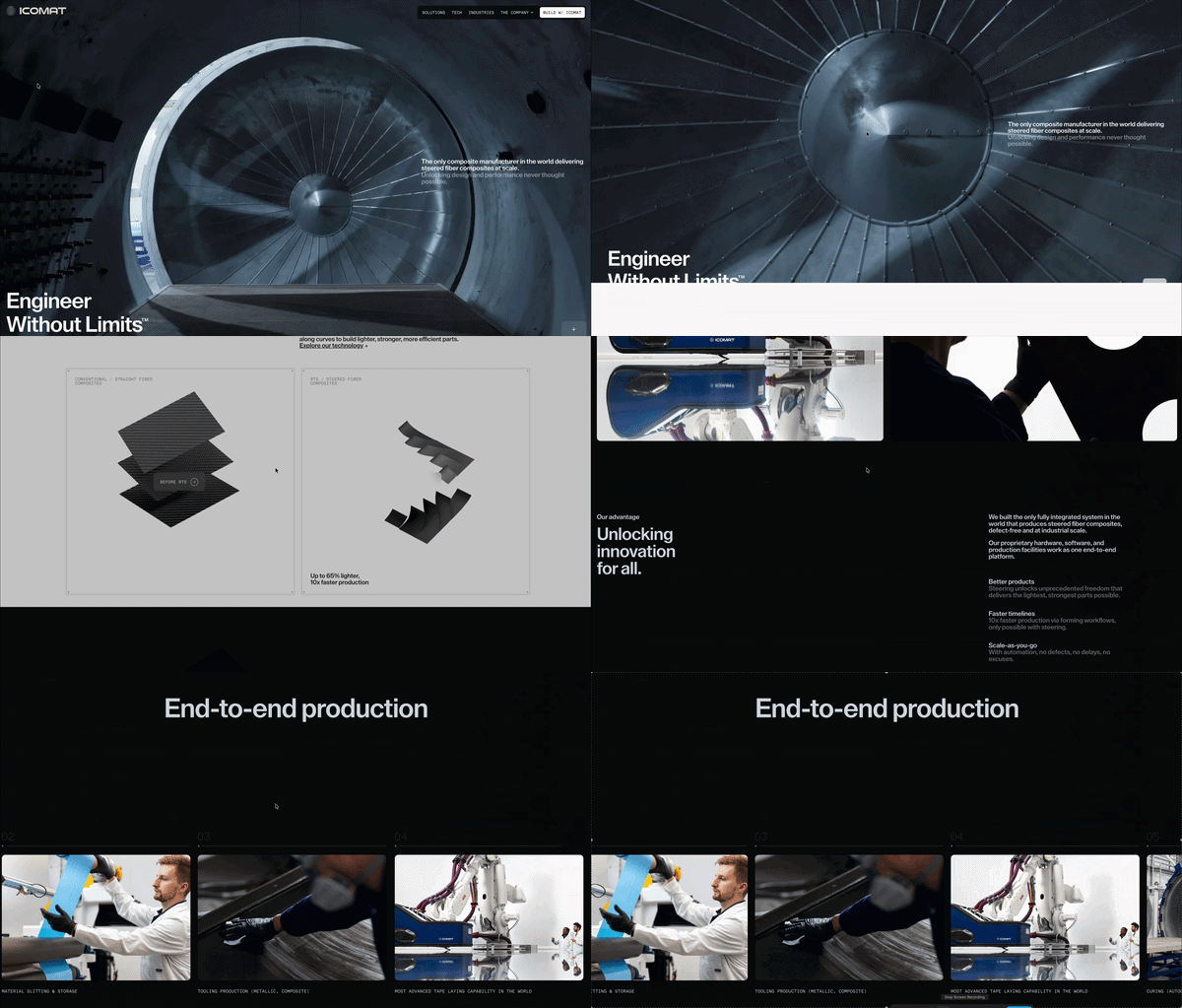
Visit site ↗What the scroll does: iCoMat makes composite structures for defence, aeronautics, space and automotive. Its "End-to-end production" section pins the heading while a row of numbered step cards (tape laying, curing, inspection, painting) slides sideways as you scroll down.
Worth copying: A production process is already a row of steps, so the sideways move means something: left to right is first to last.
Watch out for: 1,930 ms total blocking time and a 0.176 CLS (PageSpeed test, March 25, 2026).
10. Unseen Studio: Year in Review 2025
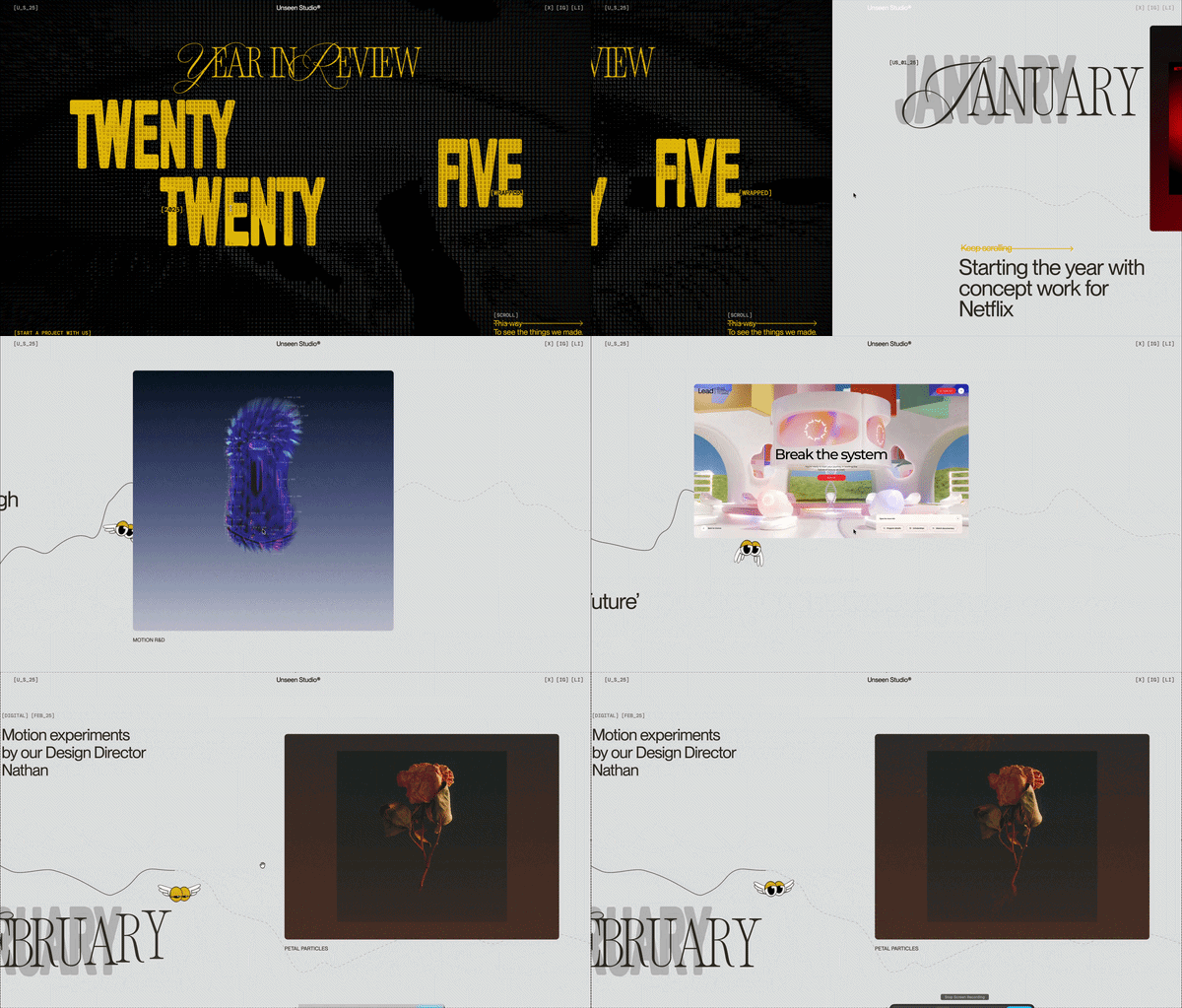
Visit site ↗What the scroll does: A creative studio's 2025 retrospective on a year-stamped subdomain. The whole site is one sideways journey: scroll down and the page travels right, month by month from January to December, past work for clients such as Netflix and L'Oreal, with a small winged mascot riding a line that runs the full length.
Worth copying: A year is already a line from January to December, so the direction means something. The first screen also tells you which way to go: "Scroll this way to see the things we made."
Watch out for: There is no native scrollbar to show how far along you are: the window's own scroll position stayed at zero when we checked. Our PageSpeed test (March 25, 2026) recorded a 13.9 s LCP on mobile.
Scroll-triggered reveals
Content fades, slides or draws itself in when it enters the viewport, then stays put. It is the cheapest scroll effect to build and the lightest to load, which is why it suits reports, product tours and any long page. The common failure is animating every element: when everything moves, nothing is emphasised, and slow devices show a page that assembles itself late.

11. Adidas Annual Report 2024
Visit site ↗What the scroll does: Adidas publishes its annual report as a scrolling site on its own subdomain. Photographs and headline type (the CEO interview, net sales, the brand chapter) appear and settle into place as each section arrives. Nothing is scrubbed: the motion is small and it finishes on its own.
Worth copying: Reveals keep a media-rich page fast. The report scored 94 for performance with a 1.1 s LCP and 90 ms total blocking time (PageSpeed test, March 25, 2026).
Watch out for: Hero images without reserved space. CLS was 0.093, a good score and still the one metric our review flagged.
12. Quoti
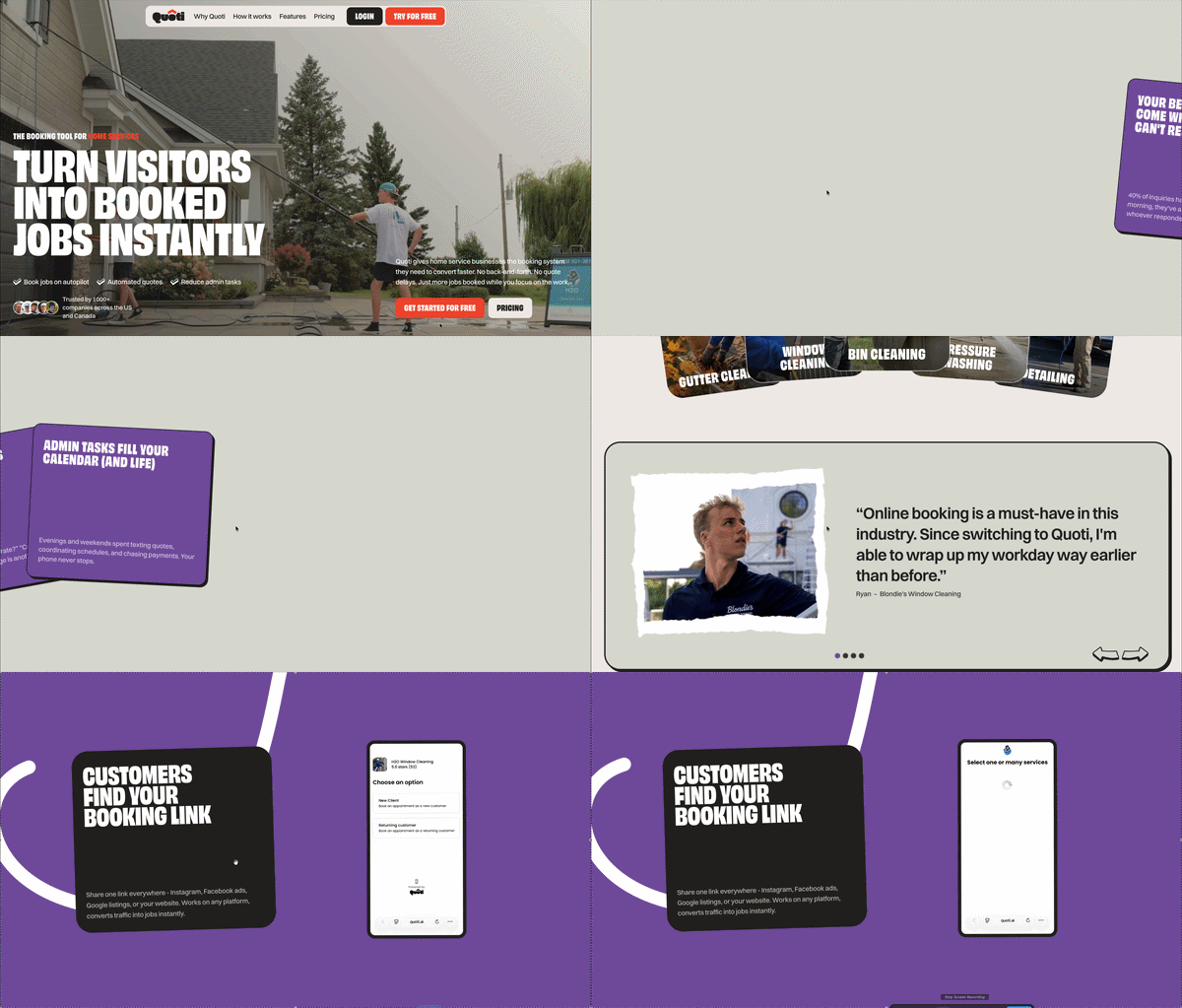
Visit site ↗What the scroll does: Quoti is a booking app for home service businesses such as window cleaning and pressure washing. The page explains the product in the order a customer meets it: steps arrive one by one along a line that runs down the page, each with a phone screen, and one pinned section slides a row of cards sideways.
Worth copying: Show the product in the order a customer would use it, one step per screen, with the real interface next to each claim.
Watch out for: Elements that arrive without reserved space. CLS was 0.384 and total blocking time 1,730 ms (PageSpeed test, March 25, 2026).
Long single-page scrolling sites
The whole site is one page: sections in a fixed order, anchor links or no menu at all, one call to action at the end. A one-page scrolling website suits a studio, a portfolio, a launch, a report or a business that does one thing. It does not suit a content-heavy site, because a single page can rank for one topic, not twenty. Lunar, Unseen and Universe to You above are single pages too. More of these, with the reasoning for each, in one-page website examples and the one-page website guide.
13. YES NOW
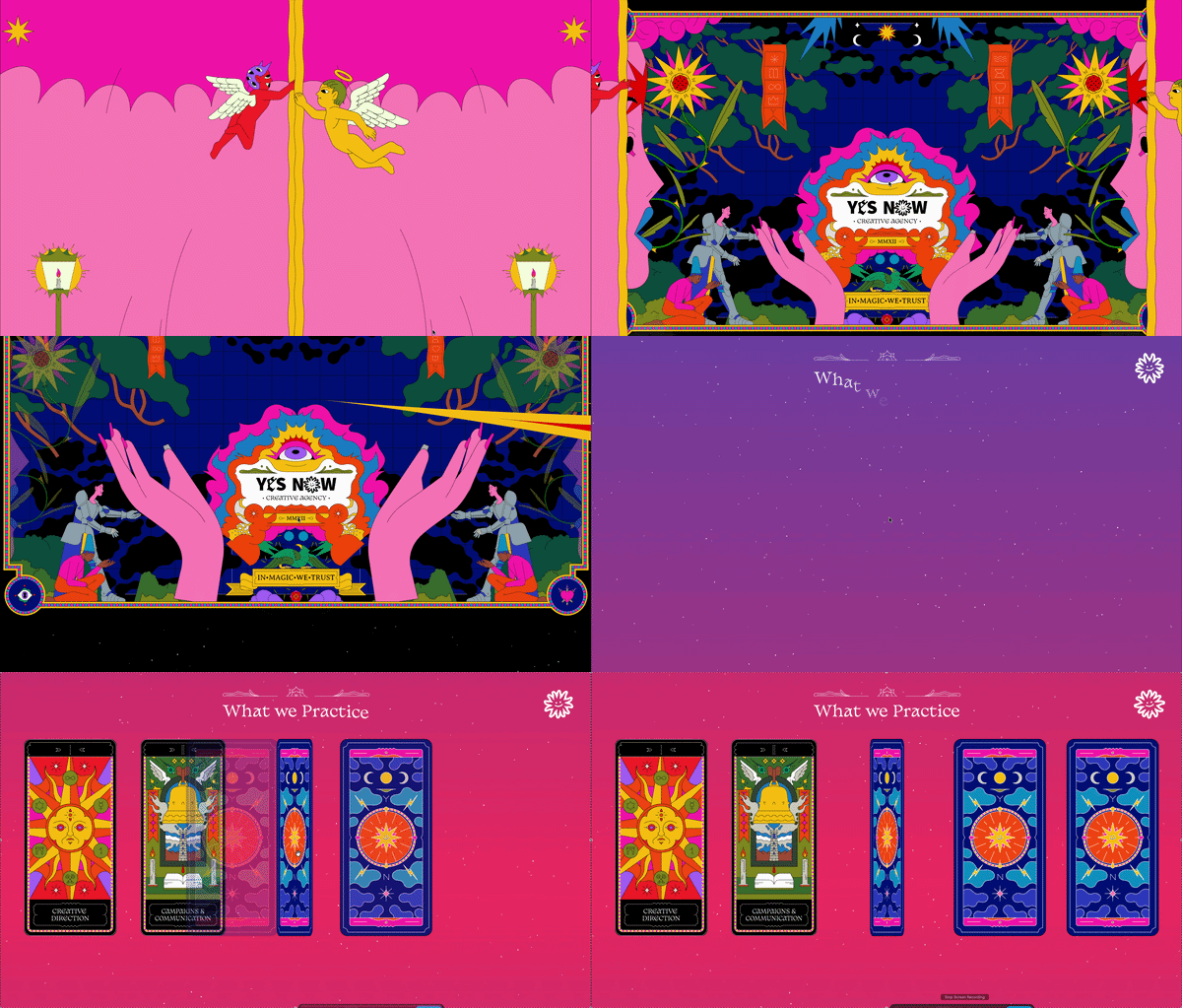
Visit site ↗What the scroll does: YES NOW is a creative agency that works for NGOs, European institutions and mission-driven organisations. The whole site is one page with no menu: an illustrated, tarot-styled scroll through what the studio does, its work, its team ("The Cast") and a contact form headed "Cast a spell".
Worth copying: A theme carried all the way through. Section names, illustrations and even the contact form stay in one voice, so a long page reads as one piece.
Watch out for: 1,320 ms total blocking time and a 0.165 CLS (PageSpeed test, March 25, 2026).
14. Nikola Radeski
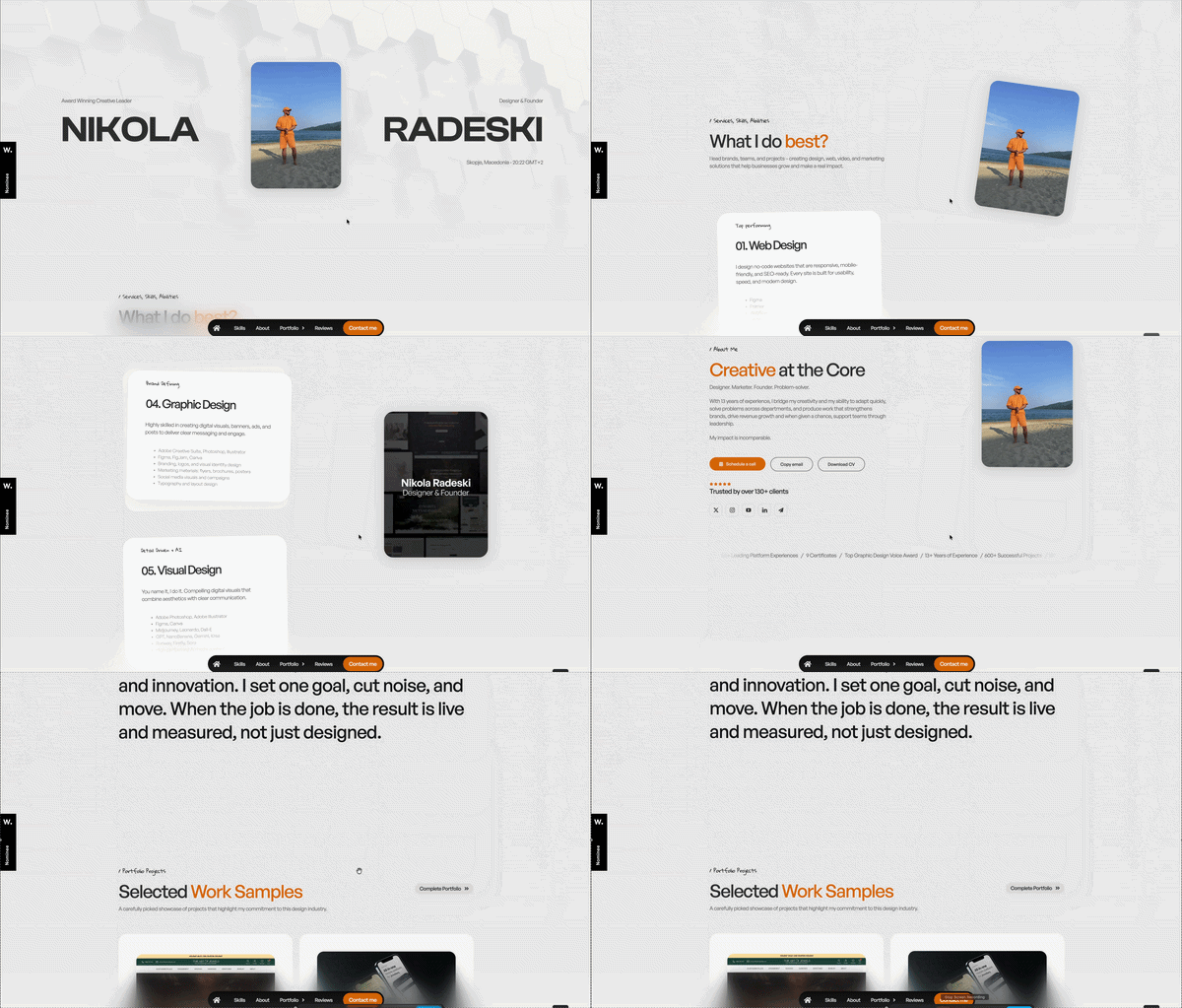
Visit site ↗What the scroll does: A designer's portfolio on one long page: skills, awards, selected work and experience, reached through a floating menu of anchor links. In the skills section a profile card stays pinned while numbered skill cards stack up beside it. A fuller portfolio sits on a second page.
Worth copying: The contact button rides in the floating menu on every screen, so it is never more than one tap from the work that impressed.
Watch out for: Image weight on phones. Our PageSpeed test (March 25, 2026) recorded a 7.6 s LCP on mobile, on an earlier version of the design.
3D scenes: real-time WebGL and pre-rendered
There are two kinds, and from the outside they look alike. Real-time 3D renders a scene live in the browser with WebGL, and the scroll moves the camera or the objects. Pre-rendered 3D is a scene rendered in advance into frames or video and scrubbed on scroll: Lunar, at the top of this page, is that kind. Real-time is the right tool when visitors have to look around freely, and it is the most expensive effect here to produce and to load. If the camera path is fixed, pre-render it. The two routes are compared in 3D scrollytelling.
15. BMW Group Report 2025
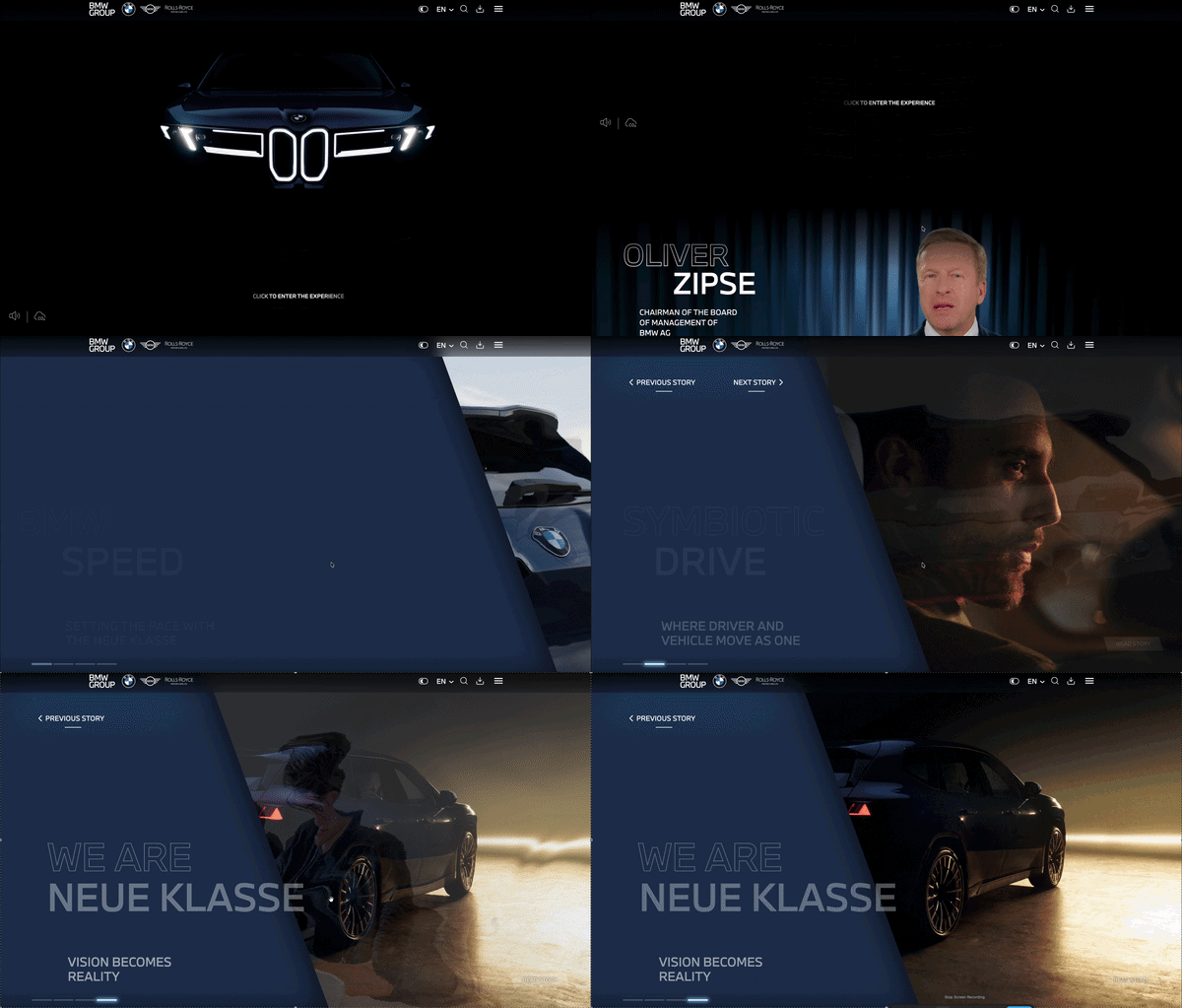
Visit site ↗What the scroll does: BMW's 2025 report is built around four stories: BMW Speed, Symbiotic Drive, Room for Talents and We are NEUE KLASSE. The home page keeps a video background fixed and brings each scene in over it as you scroll. When we checked, four of its canvases were rendering live with WebGL.
Worth copying: A fixed backdrop makes separate scenes feel like one continuous space.
Watch out for: 15,310 ms total blocking time and a 3.6 s LCP (PageSpeed test, March 25, 2026). With that much script the page can ignore a swipe, which feels like scrolljacking even though nothing takes over the scroll.
16. Porsche Motorsport
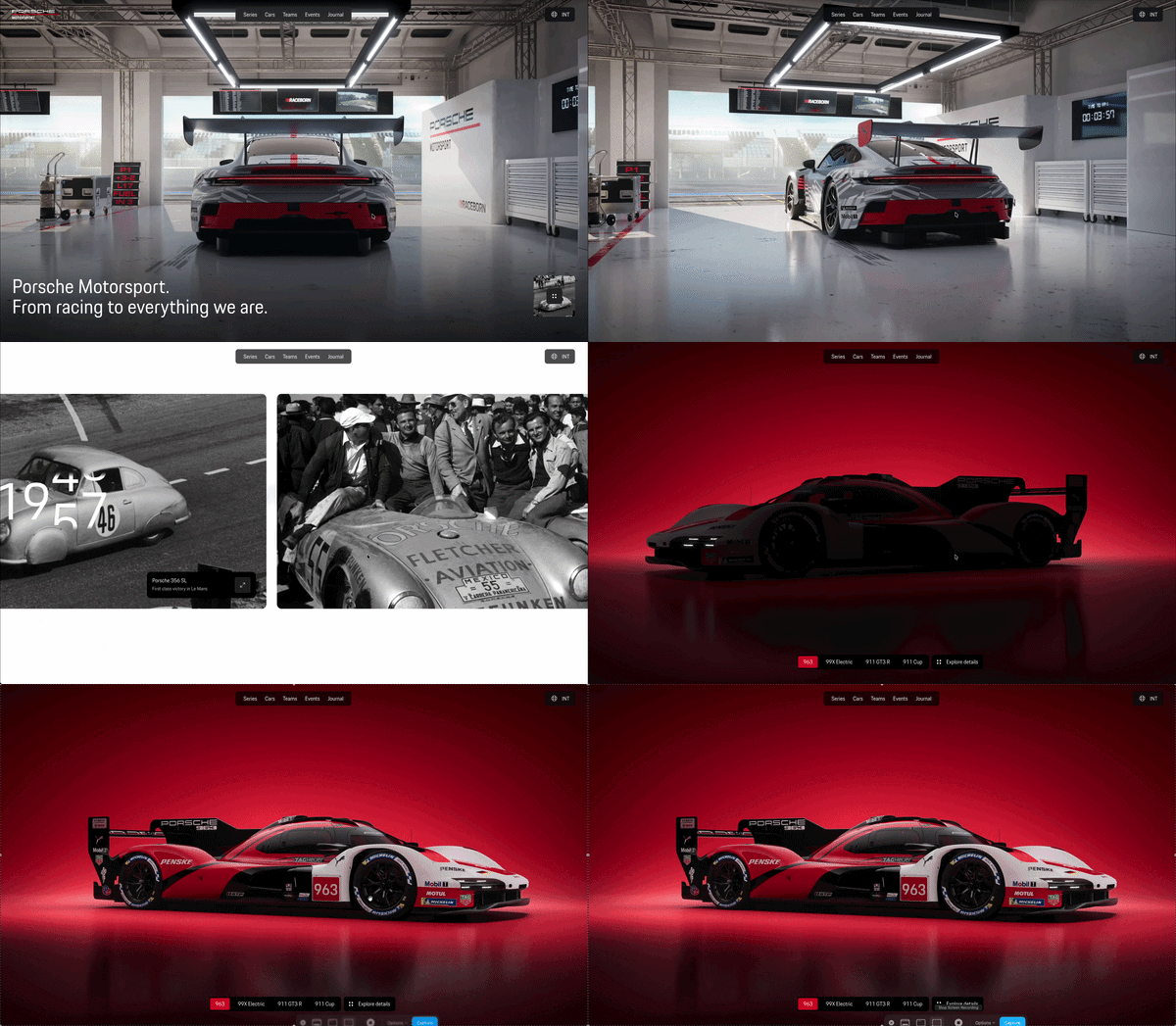
Visit site ↗What the scroll does: Porsche's motorsport hub opens inside a rendered pit garage, then scrolls into a heritage timeline that steps from the 356 SL through the 917 and the 919 Hybrid to today's 963, followed by a part-by-part breakdown of the 963: brakes, cockpit, engine, chassis.
Worth copying: The headline and navigation stay real, selectable text over the scene. First content painted in 0.6 s, CLS was 0.008 and the SEO score 100 (PageSpeed test, August 24, 2026).
Watch out for: 2,800 ms total blocking time and a 2.8 s LCP in the same test, plus a full-screen cookie dialog that covers the entrance.
Scrolljacking: the effect to avoid
What it is. Scrolljacking is when a site takes over the scroll input. It blocks the normal wheel or touch behaviour and moves the page itself, with its own speed, its own easing or its own stops. One flick advances exactly one full-screen panel, or the page keeps gliding after your finger has stopped.
Why visitors dislike it. The scrollbar stops matching the document, so people lose their place. Keyboard paging, Home and End, and find-in-page land in the wrong spot, because the browser and the site disagree about where the page is. Trackpad momentum fights the site's easing. Smooth-scroll libraries that ease the scroll position sit at the mild end of the same problem. Three sites on this page, Lunar, Inversa and Unseen, moved their content with their own scrolling when we checked: the window's scroll position never left zero. They are carefully made, and they still give up the browser's scrollbar.
How to get the effect without it. Read the scroll, never take it over. Every effect on this page, including pinned sections, scrubbed video and horizontal rows, can be built with position: sticky and the page's real scroll position, so the scrollbar, the keyboard and the trackpad keep working. If you want panels to settle into place, CSS scroll snap leaves the scrolling to the browser. Our developer guide to scroll-driven storytelling shows the code.
One more cause is worth knowing. A page does not have to hijack the scroll to feel hijacked. When scripts block the main thread for seconds, swipes do nothing, and the visitor cannot tell the difference. The BMW and Lunar figures above are that case.
How to make a scrolling website
There are three routes. They differ in who does the work and who maintains the page afterwards.
| Route | What you do | Cost | Good for | Limits |
|---|---|---|---|---|
| Hand-code it | Write the HTML, CSS and JavaScript yourself: position: sticky, IntersectionObserver, CSS scroll-driven animations or an animation library. Start with our developer guide. | Your time, plus hosting | Bespoke interactions, 3D and WebGL, custom data graphics | You own the code and every later fix |
| A general website builder with scroll effects | Design each section in a drag-and-drop site builder and attach scroll effects to elements by hand. | A monthly subscription that varies by builder (not compared here) | A full multi-page site that needs a few scroll effects | You write and design everything, and what is possible depends on the builder |
| An AI scrollytelling builder (ours) | Describe the page, paste a link or upload a file. In a few minutes AI builds the page with copy, images, a scroll-video opening and scroll widgets. You edit it in a visual editor and publish. | Free: $0 (60 credits a month, 1 published story). Starter $12, Pro $29, Pro+ $59 a month, or $10, $24 and $49 a month billed yearly | One-page, story-led sites: launches, product pages, reports, brand stories | Not a multi-page website CMS or a checkout, and no custom 3D or WebGL |
Scrollytelling plans: Free $0, Starter $12, Pro $29, Pro+ $59 a month. Prices checked November 11, 2026, full details in pricing. The Free plan includes every template and widget and a small "made with" badge. Paid plans add a custom domain and remove the badge.
If you are choosing between the first and third routes for a single effect, the scrubbed video is the one that takes longest to code well. Apple-style scroll animation compares the code and no-code versions side by side.
Scrolling website templates
A template is the fastest start if you already know the kind of page you need. Every template below is a finished scrolling page with the effects in place. You change the text and images in the browser, or ask the AI to rewrite it for your business.
- All templates: more than 150 free templates in 30 categories, from brand stories and product launches to annual reports.
- One-page website templates: one page scrolling website templates sorted by job, such as business, launch, portfolio and event.
- Microsite templates: campaign and product pages that live apart from a main site.
To try a single effect before choosing a template, the widget playgrounds are free and need no signup.
Do scrolling websites hurt SEO or performance?
Not because they scroll. In our PageSpeed tests the sites above range from 90 ms of total blocking time (Adidas) to 21,570 ms (Lunar), and the difference is how each was built, not the fact that it scrolls. Five rules cover most of it.
- Keep the words as real HTML text. Headings and paragraphs belong in the page source, not painted into a canvas or baked into video frames. Porsche keeps its headline and navigation as selectable text over a rendered scene and scored 100 for SEO in PageSpeed.
- Do not hide content behind scroll position. Google's guidance on lazy-loaded content says "Google Search does not interact with your page", so content that only loads after a scroll or a click may never be indexed. Put the content in the page and let the scroll change how it looks, not whether it exists. Source: Google Search Central, Fix lazy-loaded content (read November 11, 2026).
- Lazy-load media below the fold and reserve its space. Give every image and video a width and height so the layout does not jump, and load the first frame of a hero early. In our reviews, most of the slow LCP figures above traced back to heavy images and background video.
- Respect
prefers-reduced-motion. Visitors who switch on reduced motion on their device should get the same content without parallax, pinning or scrubbing: show the end state and keep the text. - Accept the one-topic limit of a single page. A one-page site ranks for its name and its one subject. If you need to rank for many searches, you need many pages.
The longer version, with the failure mode of each pattern and the mobile fallbacks, is in scrollytelling design patterns.
FAQ
What is a scrolling website?
A scrolling website is a site where scrolling is the main way to move through the content and the page responds to it: video advances, sections pin, images reveal, panels slide sideways. Many are a single long page. The same thing is also called a scroll-driven, scroll-based or interactive scroll website.
What is scrolljacking?
Scrolljacking is when a site overrides normal scrolling: it intercepts wheel and touch input and moves the page at its own speed, or one full-screen panel at a time. Visitors dislike it because the page stops following their hand, the scrollbar no longer shows where they are, and keyboard scrolling breaks. Pinned sections and scroll-linked animation give the same look while the scrollbar keeps working normally.
What is the difference between a scrolling website and scrollytelling?
A scrolling website is any site built around scroll effects. Scrollytelling is narrower: telling a story in a fixed order as the reader scrolls, with visuals that change to match the text. A portfolio with parallax is a scrolling website. A report that walks through a chart step by step is scrollytelling. Several of the examples on this page are both. More in what is scrollytelling.
How do I make a one-page scrolling website?
Put the sections in the order a visitor decides (what it is, proof, details, one call to action), use anchor links in place of a menu, and add one or two scroll effects where the content changes gear. You can hand-code it, build it in a general website builder, or describe it to an AI builder: the free one-page website builder on Scrollytelling makes the page from a sentence about your business. Open the one-page website builder or read how to make a one-page website.
Are there free scrolling website templates?
Yes. Scrollytelling has more than 150 free templates in 30 categories, and every one is available on the Free plan ($0, 60 credits a month, one published story). There are also curated sets of one-page website templates and microsite templates. Each is a finished page you edit in the browser. Start at templates, one-page website templates or microsite templates.
Make a scrolling website from a sentence
Describe the page or paste a link. AI builds the scroll effects, the images and a scroll-video opening in a few minutes, and you edit the result. The Free plan is $0.
Create your story → Open the free one-page website builder →